QR code generator for warranty registration

Convert warranty registration forms into scannable QR codes that customers can complete in seconds from their phone.
How QR codes simplify warranty registration
Buying a product with a warranty can be great! But only if you hold onto the warranty paper itself. It's super easy to misplace or even just throw away the documentation you need only to need it later and not have it. This can be especially frustration, but it can be totally eliminated through the use of QR codes!

A warranty registration QR code allows customers to save a digital copy of a products' warranty onto their own devices. This way they won't have to worry about misplacing the paper and will always know how to find the document they need. This approach works for everything from kitchen appliances to electronics to outdoor equipment, similar to how contact information QR codes simplify data sharing.
Throughout this piece I'll walk you through setting up your own warranty registration QR code using QR Code Developer and share strategies that actually get customers to register their products. So let's dive right in!
Where warranty registration QR codes work best
Warranty registration QR codes solve the fundamental problem of low registration rates across industries. These codes work particularly well when combined with landing pages designed specifically for mobile completion.
Electronics and appliance manufacturers
TV boxes, refrigerator packaging, and smartphone cases include QR codes that link to warranty forms pre-populated with model numbers and purchase information. Many companies also incorporate these codes into QR code stickers placed directly on the products themselves.
Automotive parts and accessories
Car part manufacturers place QR codes on packaging that connect to warranty registration forms, often integrated with installation guides and maintenance schedules.
Home improvement and tools
Power tool companies and home improvement retailers use QR codes on product tags that link to warranty registration combined with safety information and user manuals.
Furniture and home goods
Furniture stores attach QR codes to price tags or care instruction cards that connect to warranty registration forms, often bundled with assembly instructions and care guides.
Creating your warranty registration QR code
Setting up a warranty registration QR code takes about 10 minutes once you have your registration form ready. The key is making sure your form works well on mobile devices since most customers will scan with their phones.
Set up your warranty registration form
Create a mobile-friendly warranty registration form on your website or use a service like Google Forms. Include fields for product model, serial number, purchase date, and customer contact information. Test the form on different phone sizes to ensure it's easy to complete.
Generate your QR code at qrcodeveloper.com
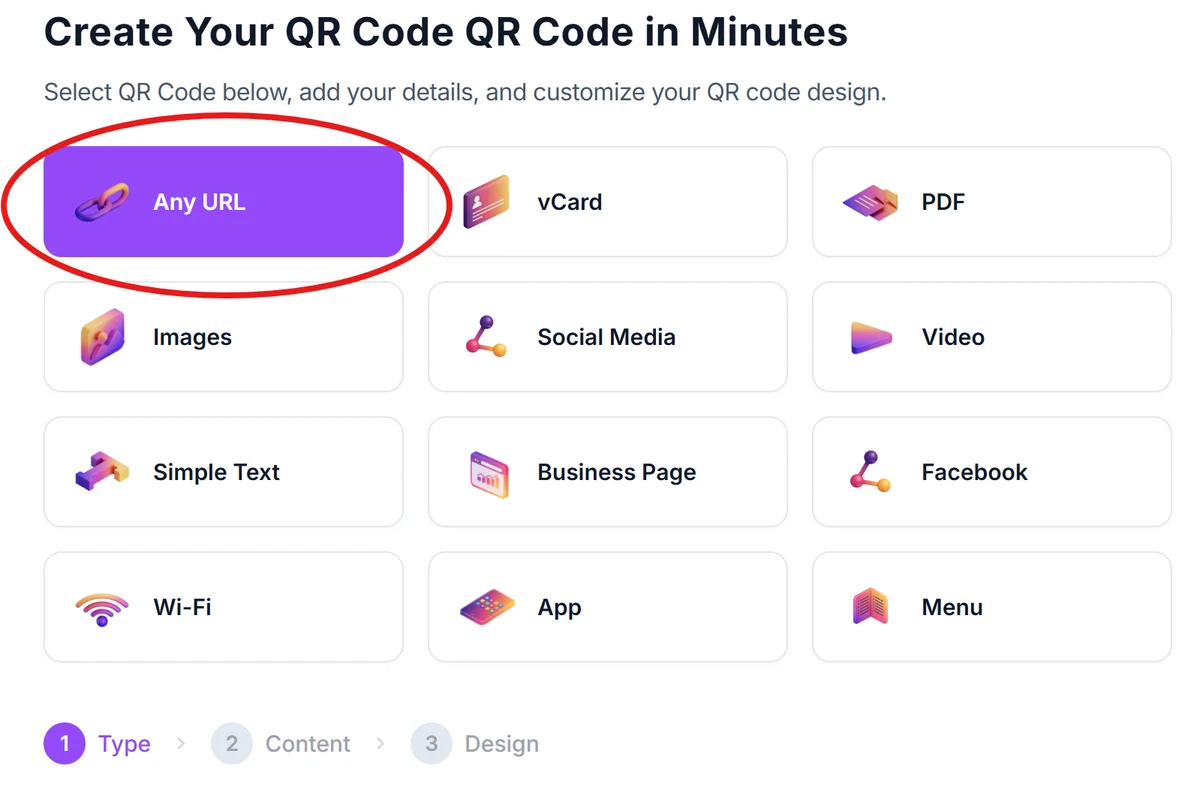
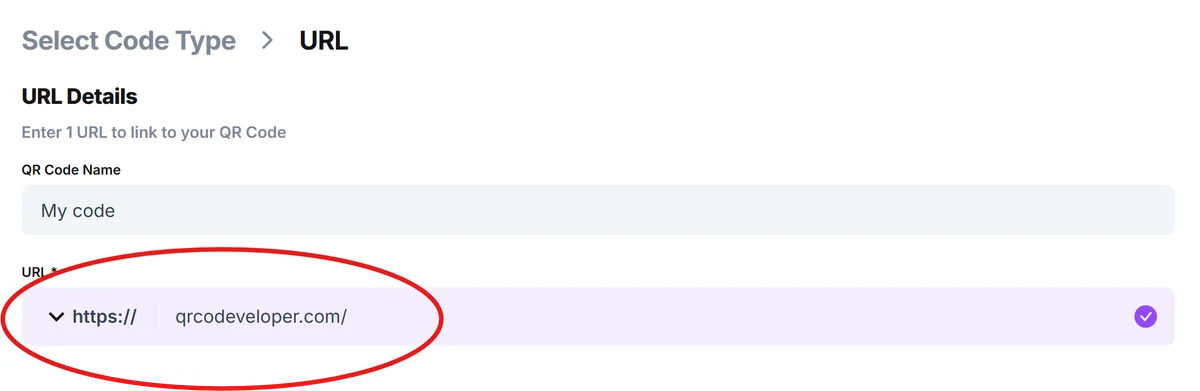
Visit qrcodeveloper.com and select URL as your QR code type. Paste your warranty registration form URL into the content field. This creates a direct link from scan to registration completion.
Customize for brand recognition
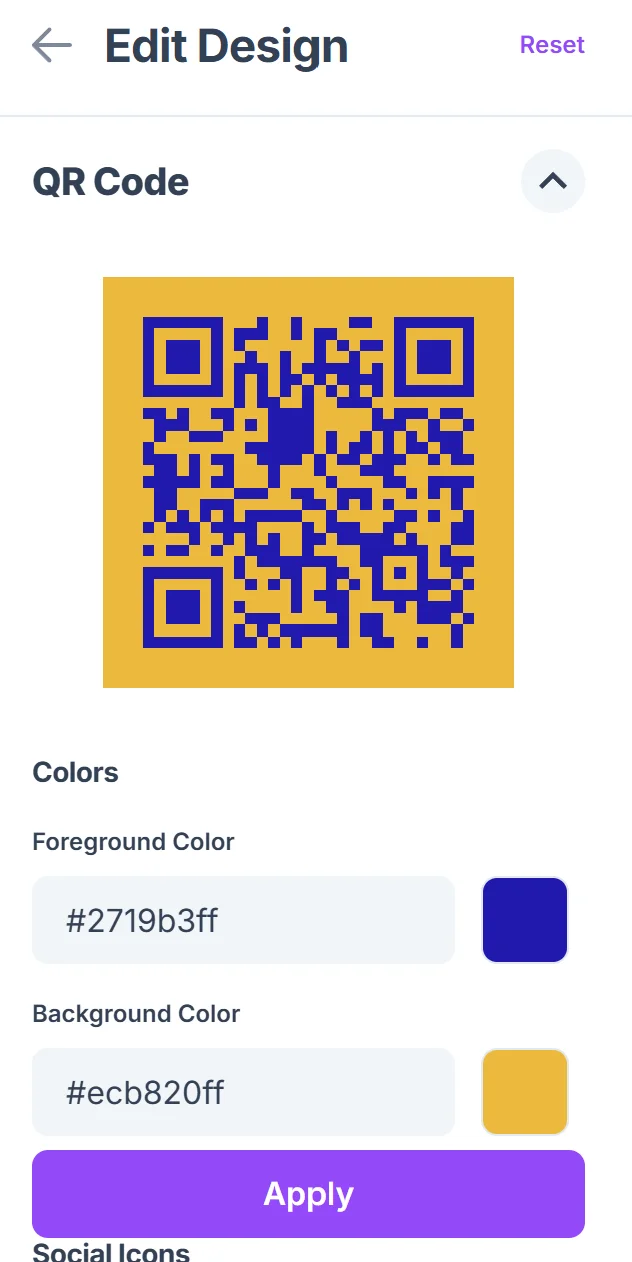
Add your company logo to the center of the QR code and adjust colors to match your brand. Include a clear call-to-action like 'Scan to Register Your Warranty' below the code. Keep the design clean so scanning remains reliable, following proven QR code design tips for optimal readability.

Test across different devices
Scan your QR code with multiple phone types and operating systems to ensure the form loads correctly. Test the entire registration process from scan to submission to catch any mobile compatibility issues.
Place strategically on packaging
Position the QR code where customers will see it when unboxing - typically on the inside of packaging or on quick-start guides. Include backup instructions with a short URL for customers who prefer manual entry.
Best practices for warranty QR codes
Getting customers to actually scan and complete warranty registration requires more than just placing a QR code on your packaging. These strategies help maximize registration completion rates.
Pre-populate form fields when possible. If you can include product model or serial number in the QR code URL parameters, do it. Customers are more likely to complete forms that require minimal typing on their phones.
Size your QR code for easy scanning. Make codes at least 1 inch square on packaging, and ensure there's white space around the edges. Test scanning from arm's length since that's how most people naturally hold products. For additional guidance on scanning techniques, check out our guide on how to scan a QR code from a photo.
Combine registration with value-added content. Link to a landing page that includes warranty registration plus user manuals, care instructions, or exclusive offers. This gives customers multiple reasons to scan.
Use dynamic QR codes for tracking and updates. Dynamic codes let you see how many people scan versus how many complete registration, and you can update the destination URL without reprinting packaging if needed.
Frequently Asked Questions
Can I track how many people scan my warranty registration QR code?
Yes, dynamic QR codes provide scan analytics including total scans, unique scans, and scan locations. You can also use Google Analytics on your registration form to track completion rates and see where people drop off in the process.
What information should I include on my warranty registration form?
Keep it minimal: product model, serial number, purchase date, and customer contact information. The shorter the form, the higher your completion rate. You can always follow up with additional surveys later.
Should I use static or dynamic QR codes for warranty registration?
Dynamic QR codes work better for warranty registration because you can update the destination URL if you change form platforms, plus you get valuable analytics on scan and completion rates.
Where should I place warranty registration QR codes on packaging?
Inside the packaging where customers see it during unboxing works best. Avoid placing codes on the outside where they might get damaged during shipping. Include them on quick-start guides or warranty cards too.
Do warranty registration QR codes work with all smartphones?
Yes, all modern smartphones can scan QR codes through their built-in camera apps. For older phones, customers can download free QR scanner apps. Always include a backup short URL for manual entry.
Related Guides
Ready to create your QR code?
Generate custom QR codes in seconds - free and easy to use.
Create Free QR Code →