QR codes for loyalty programs and customer rewards

Connect customers to your rewards program instantly with scannable codes that make earning and redeeming points effortless.
How loyalty program QR codes boost customer engagement
What if you could turn every receipt, business card, or storefront into an instant gateway to your loyalty program? Well, with QR codes, you can! Loyalty program QR codes eliminate the friction that keeps customers from joining reward systems - no more downloading apps first, remembering usernames, or typing long URLs on mobile devices. Just scan and go!

A loyalty program QR code connects customers directly to your rewards system with a simple scan. Whether it's signing up for your program, checking point balances, redeeming rewards, or accessing exclusive member offers, these codes make the entire loyalty experience accessible in seconds. Customers can join your program while they're still in your store or immediately after making a purchase online.
Throughout this guide, I'll show you how to create effective loyalty QR codes that increase program enrollment and engagement. You'll also discover how different types of QR codes can serve various loyalty program functions, from simple sign-up links to dynamic codes that track individual customer interactions. So let's dive right in!
Smart ways businesses use loyalty QR codes
Loyalty QR codes work across industries because they solve the universal problem of program adoption barriers. Here are the most effective applications I've seen businesses implement, including strategies similar to those used in restaurant QR code systems.
Point-of-sale enrollment
Retail stores place QR codes on receipts and checkout counters, allowing customers to join the loyalty program immediately after purchase when they're most engaged.
Reward redemption stations
Coffee shops and restaurants use QR codes on tables and counters that let existing members quickly access their point balance and available rewards without waiting in line.
Exclusive member access
Boutiques and specialty stores create QR codes that unlock member-only product previews, early sale access, or special event invitations for VIP customers.
Points balance checking
Service businesses like salons and gyms use QR codes in waiting areas that allow customers to check their points, book appointments with member discounts, or refer friends to earn bonus rewards.
Building QR codes for your reward system
Creating loyalty program QR codes requires connecting the right destination to your specific program goals. The process varies depending on whether you're driving sign-ups, reward redemptions, or member engagement.
Access your QR code generator
Visit qrcodeveloper.com and select the URL option since most loyalty programs use web-based platforms or mobile-optimized landing pages.
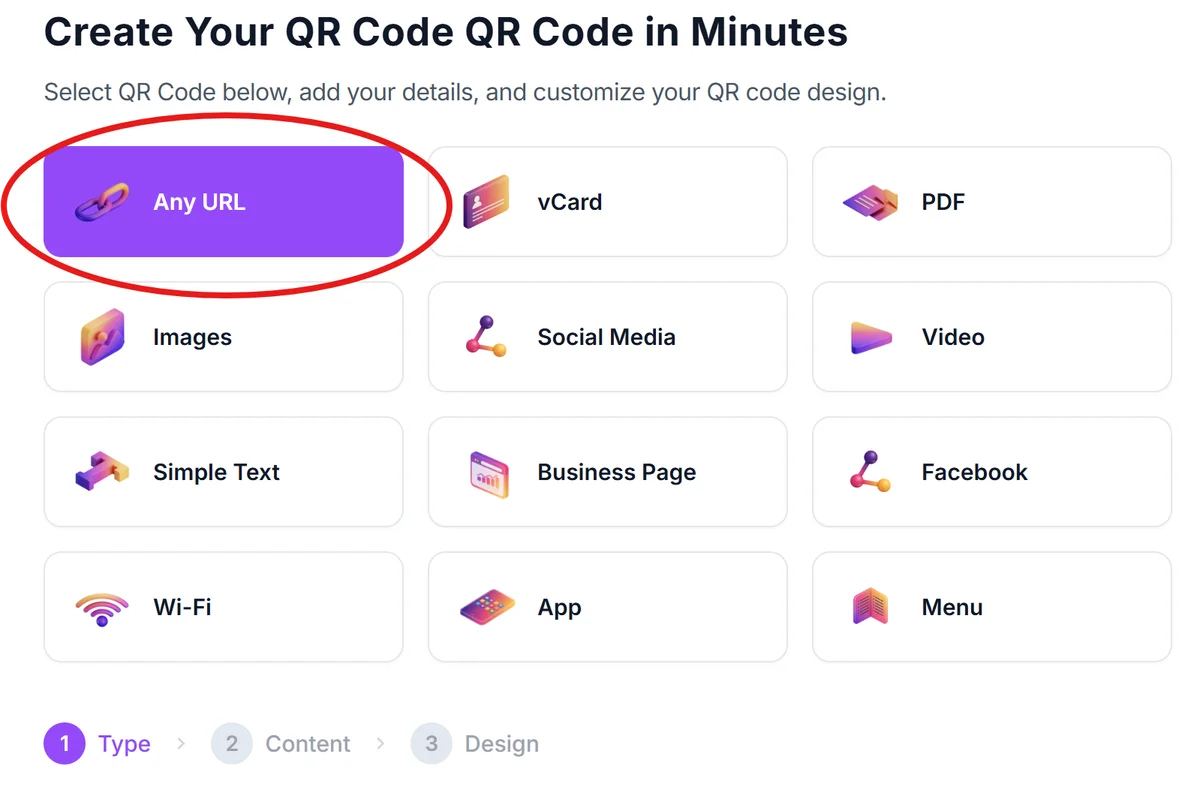
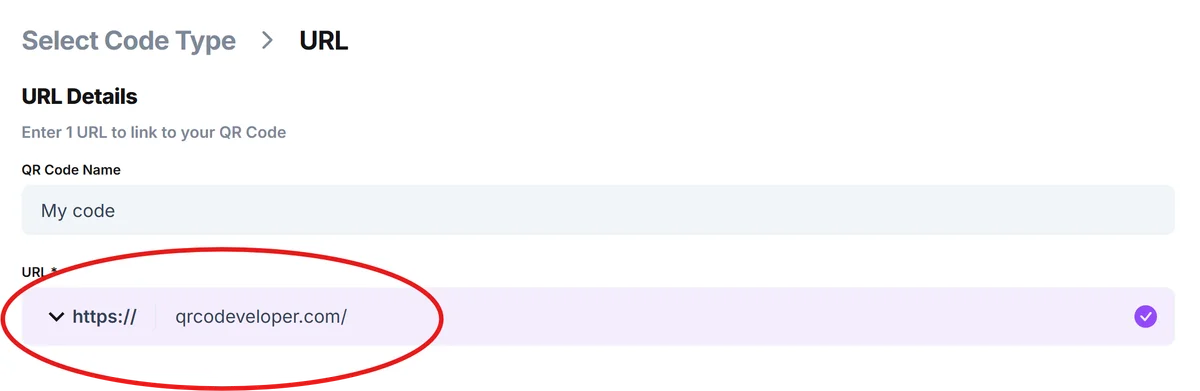
Enter your loyalty program destination
Input your loyalty program URL - this could be your sign-up page, member portal login, rewards catalog, or a custom landing page that explains program benefits and enrollment steps.
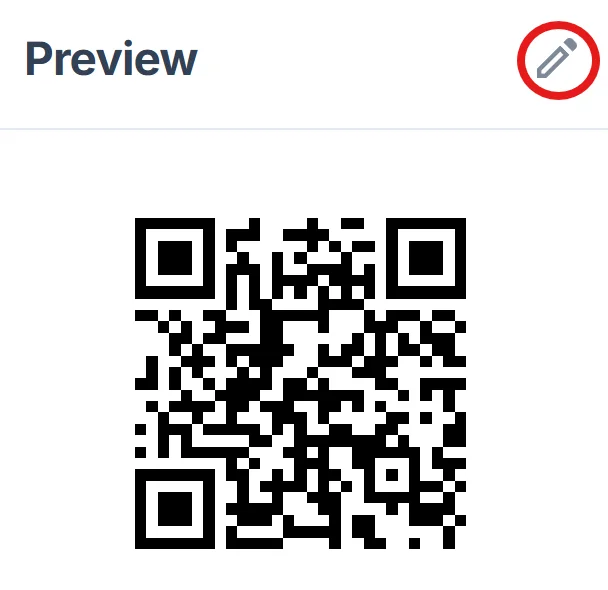
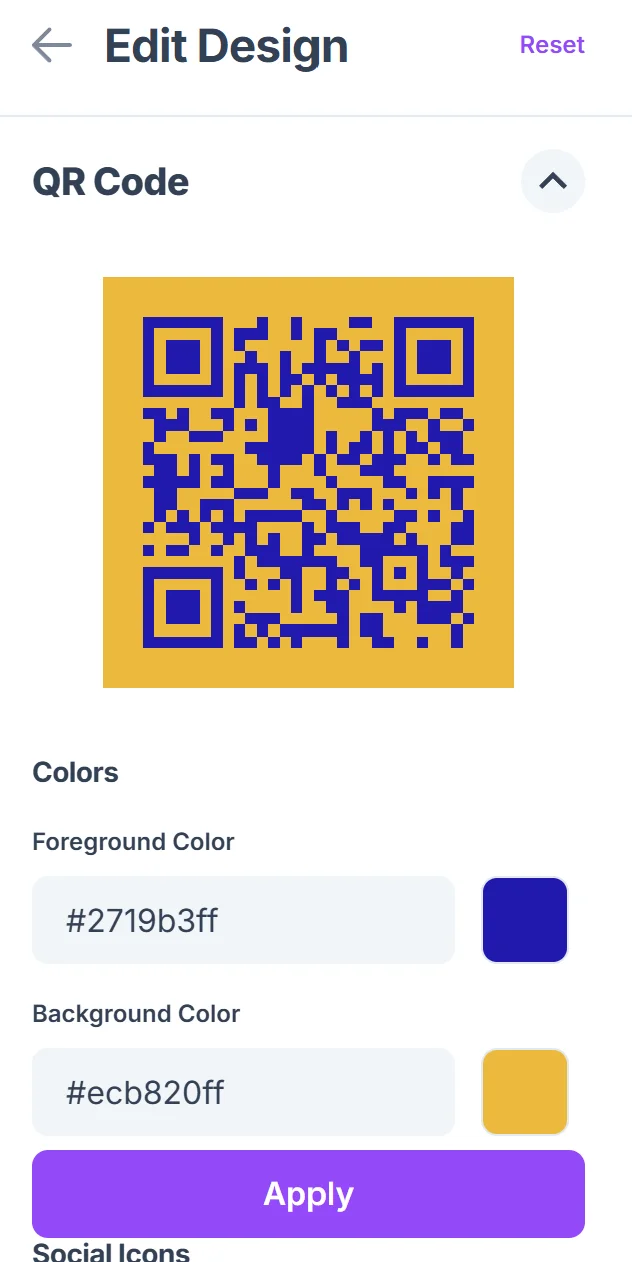
Brand your QR code design
Click on the pencil icon in the Preview window to further customize your code. Customize colors to match your brand and add your logo if desired. For loyalty programs, consider using your brand's primary colors to maintain visual consistency across all customer touchpoints. Learn more about effective QR code design principles to maximize scan rates.
Test across customer devices
Scan your QR code with different smartphones to ensure it loads quickly and displays properly on various screen sizes. Test the entire user flow from scan to program enrollment or reward redemption.
Deploy strategically across touchpoints
Place QR codes where customers are most likely to engage - receipts, packaging, storefront windows, business cards, and email signatures. Consider the customer journey and timing for maximum conversion.
Best practices for loyalty program QR codes
Successful loyalty QR codes require strategic placement and clear value communication. Here's what I've learned from businesses that see high enrollment rates:
Include clear instructions like 'Scan to join our rewards program and get 10% off your next purchase' so customers understand the immediate benefit before scanning
Place QR codes on receipts near the total amount when customers are most aware of their spending and potential savings from future loyalty rewards. You can also create QR code stickers for packaging and promotional materials to expand your program's reach.
Use dynamic QR codes if you want to track enrollment sources or A/B test different landing pages - this helps identify which placements drive the most sign-ups
Design mobile-first landing pages since 100% of QR code scans happen on smartphones - ensure fast loading times and simple enrollment forms that work with autofill
Frequently Asked Questions
Can I track how many people join my loyalty program through QR codes?
Yes, by using dynamic QR codes and setting up tracking parameters in your loyalty platform's URL. This shows you which QR code placements drive the most enrollments.
What's the best size for loyalty program QR codes on receipts?
Aim for at least 1 inch (2.5 cm) square on receipts. Smaller codes may not scan reliably, especially if receipt paper is thin or customers are scanning in poor lighting.
Should I create different QR codes for sign-ups versus existing member features?
Yes, create separate QR codes for new member enrollment and existing member actions like checking balances or redeeming rewards. This allows for targeted messaging and better user experience.
How do I handle customers who don't have smartphones?
Always provide alternative enrollment methods alongside QR codes - include your website URL in text form and offer in-store enrollment assistance for customers who prefer traditional methods.
Are there any costs for creating loyalty program QR codes?
Basic QR codes are free to create. You only pay for your loyalty program platform itself - the QR codes simply provide an easier way for customers to access the program you already have.
Related Guides
Ready to create your QR code?
Generate custom QR codes in seconds - free and easy to use.
Create Free QR Code →