Emergency access QR codes for instant contact information

Provide first responders and family members with instant access to critical medical information and emergency contacts through scannable codes.
How emergency QR codes save precious time in critical situations
Everyday, more and more emergency services adopt QR code technology for faster access to critical information, according to First Response Insights. This highlights the growing importance of QR codes in today's digital landscape across all fields.
Emergency access QR codes solve many common problems by storing vital information that first responders, medical personnel, or everyday civilians can access instantly by scanning a code on your phone's lock screen, medical ID bracelet, or wallet card. The QR code can link to a digital emergency profile containing medical conditions, allergies, medications, emergency contacts, and special instructions.
Creating an emergency QR code system requires careful planning to ensure the information remains accessible even when your phone is locked or damaged. In this guide I'll walk you through setting up a comprehensive emergency access system using QR Code Developer that works reliably when every second counts. So let's get started!
Essential emergency access scenarios where QR codes matter most
Emergency QR codes serve as digital lifelines in situations where traditional identification methods fail. These codes become especially valuable when combined with contact information QR codes for comprehensive emergency preparedness.
Medical emergency identification
Paramedics and ER staff can quickly access critical medical information, allergies, current medications, and emergency contacts when patients cannot communicate.
Child safety and identification
Parents attach QR codes to children's clothing or accessories, allowing strangers to contact parents immediately if a child becomes lost or separated.
Elderly care and dementia support
Caregivers and family members can be contacted instantly when seniors with memory issues become confused or lost in public spaces.
Travel and adventure safety
Hikers, travelers, and adventure enthusiasts carry QR codes that provide emergency contacts and location information to rescue teams or local authorities.
Setting up your emergency contact QR code system
Building a reliable emergency QR code requires creating a digital emergency profile that remains accessible regardless of device status or internet connectivity.
Build your emergency information page
Create a simple web page or Google Doc containing your emergency contacts, medical conditions, allergies, medications, and special instructions. You can also convert important documents to PDF QR codes for easy access. Use qrcodeveloper.com to generate the QR code once your page is ready.
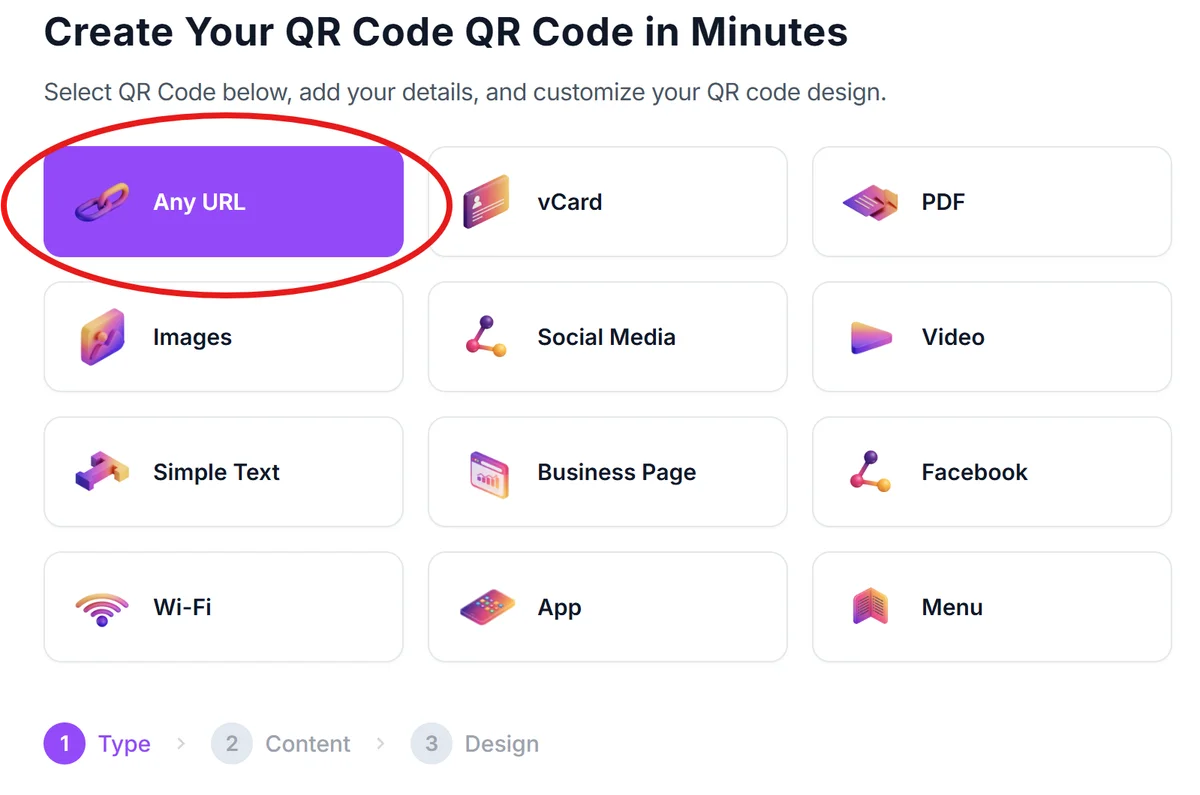
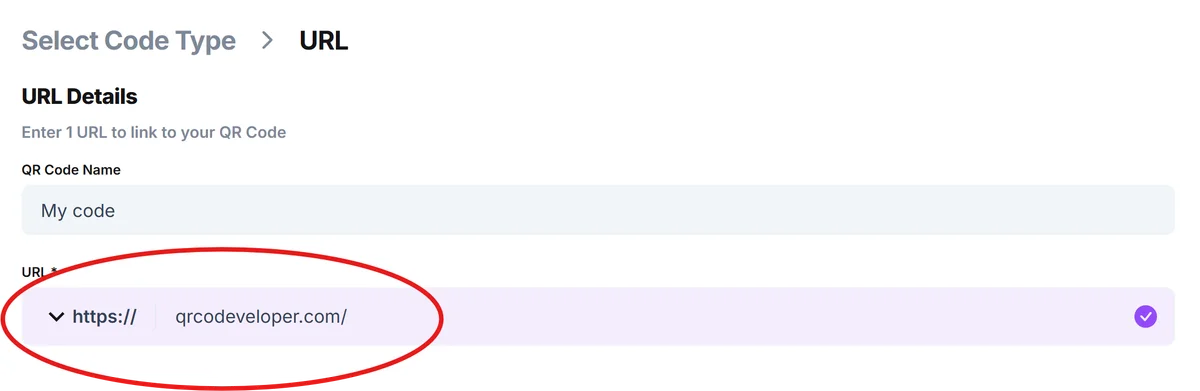
Enter your emergency profile URL
Copy the link to your emergency information page and paste it into the URL field. Ensure the page is publicly accessible without requiring login credentials or special permissions.
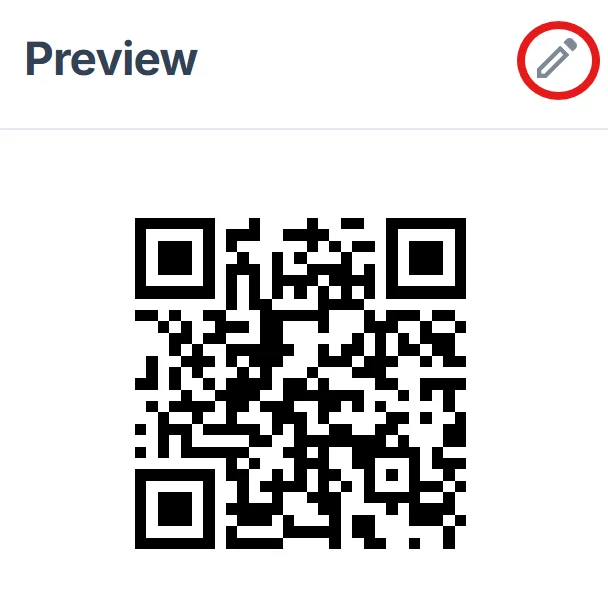
Design for emergency visibility
Click on the pencil icon in the Preview window to further customize your code. Choose high contrast colors (black on white works best) and add a clear label like 'EMERGENCY CONTACTS' or 'MEDICAL INFO' below the QR code to help first responders identify its purpose. For professional design guidance, check our QR code design tips.
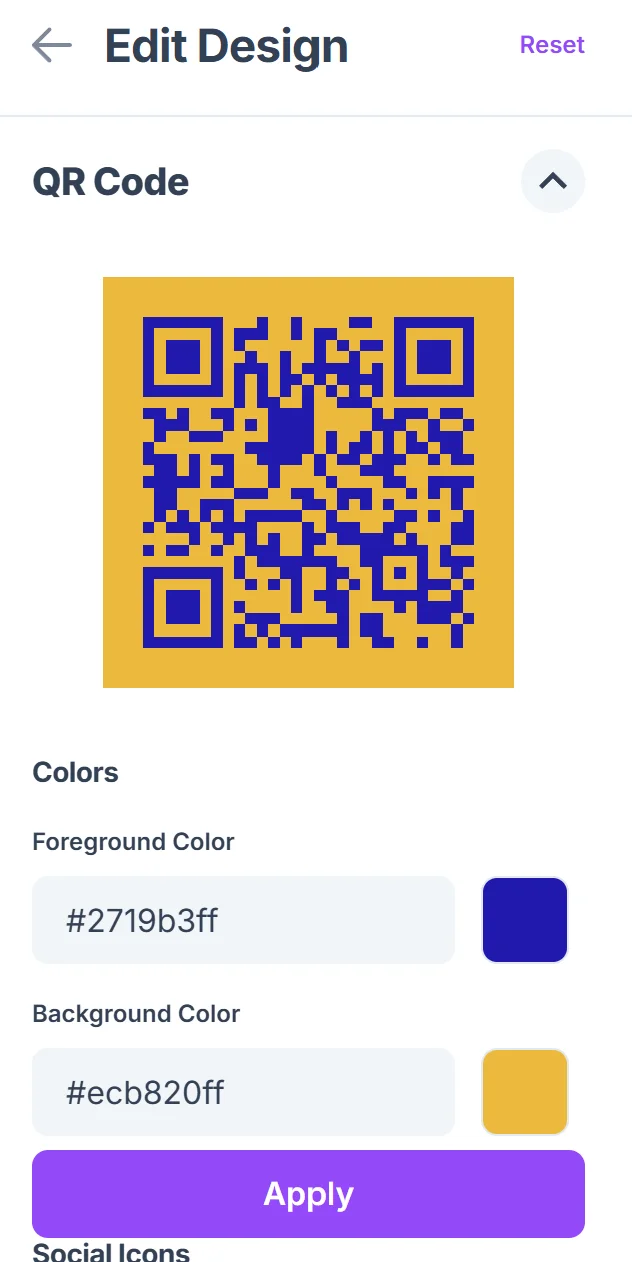
Test accessibility across devices
Scan your QR code using different smartphones and verify the information loads quickly without requiring special apps or account access. Test both with and without internet connectivity if possible.
Deploy across multiple locations
Print the QR code on waterproof stickers for your phone case, create wallet cards, add to medical ID jewelry, and consider temporary tattoos for extended outdoor activities. Learn more about creating durable QR code stickers for various applications.
Best practices for reliable emergency QR codes
Emergency QR codes must work flawlessly when lives depend on them, so following these reliability guidelines is crucial.
Keep information current by reviewing and updating your emergency profile monthly, especially after medication changes, address moves, or new medical diagnoses
Use multiple backup methods - create both digital profiles and physical cards with printed information in case scanning technology fails or devices are damaged
Make information universally accessible by avoiding password-protected sites, private social media profiles, or platforms that require app downloads to view content
Test regularly in real-world conditions by having family members or friends scan your codes using different devices and network conditions to ensure consistent access
Frequently Asked Questions
What information should I include in my emergency QR code?
Include emergency contact names and phone numbers, medical conditions, current medications, known allergies, blood type, preferred hospital, and any special medical instructions. Avoid including social security numbers or financial information.
How do I make sure first responders know to scan my QR code?
Label your QR code clearly with 'EMERGENCY CONTACTS' or 'MEDICAL INFO' and place it prominently on your phone case, medical ID bracelet, or wallet. Consider adding the universal medical symbol alongside the code.
Can I password-protect my emergency information for privacy?
No, emergency information must be immediately accessible without passwords or logins. The whole point is instant access during critical situations when you cannot provide credentials yourself.
What happens if my phone is damaged or the QR code won't scan?
Always carry backup methods like a printed emergency card with the same information, or consider medical ID jewelry with engraved details. Multiple access points ensure information remains available even if technology fails.
Is it safe to put medical information in a publicly accessible QR code?
Focus on life-saving medical information rather than comprehensive health records. Include only what first responders need to know immediately - allergies, critical conditions, medications, and emergency contacts.
Related Guides
Ready to create your QR code?
Generate custom QR codes in seconds - free and easy to use.
Create Free QR Code →