Text QR code generator for sharing messages instantly

Share any written message, instruction, or information through a simple scan instead of lengthy typing or dictation.
How text QR codes eliminate typing and transcription errors
Have you ever wanted to share a small message on something like a business card or a flyer? Nothing huge, like a full text document, just a couple of words. Well, you can through clever use of QR codes!
QR codes can store plain text that displays immediately when scanned. Unlike URL QR codes that redirect to external websites, text codes can show the message directly in the scanner app. This makes them perfect for sharing passwords, product codes, addresses, instructions, or any information that needs to be transferred accurately between devices or people. Understanding the different types of QR codes helps you choose the right format for your specific needs.
In this guide I'll show you how to create effective text QR codes and explore the many ways they can simplify your daily information sharing, plus share insights from working with QR Code Developer to help you get the best results. So let's dive right in!
Practical applications for text-based QR codes
Text QR codes solve real communication challenges across personal and professional settings. Whether you're sharing complex information that's prone to typos or need to distribute the same message to multiple people efficiently, these codes eliminate the friction of manual text entry. Similar to how contact information QR codes simplify sharing details, text codes make any written information instantly accessible.
Technical support and troubleshooting
IT teams embed diagnostic commands, error codes, or step-by-step instructions in QR codes, ensuring users get exact syntax without typing mistakes that could break procedures.
Product registration and warranty information
Manufacturers include serial numbers, model codes, or warranty terms in QR codes on packaging, letting customers instantly access registration details without manual entry. This approach is particularly effective when combined with QR codes on food packaging strategies for comprehensive product information.
Event logistics and coordination
Event organizers share meeting locations, parking instructions, or special access codes through QR codes on tickets, badges, or promotional materials. For comprehensive event planning, consider how to create event QR codes that handle multiple types of information seamlessly.
Educational content and assignments
Teachers distribute homework instructions, reading lists, or project requirements via QR codes, ensuring students receive complete and accurate information every time.
Creating your first text QR code
Building a text QR code takes just minutes and requires no technical expertise. The key is preparing your text content thoughtfully before generating the code.
Access the text QR generator
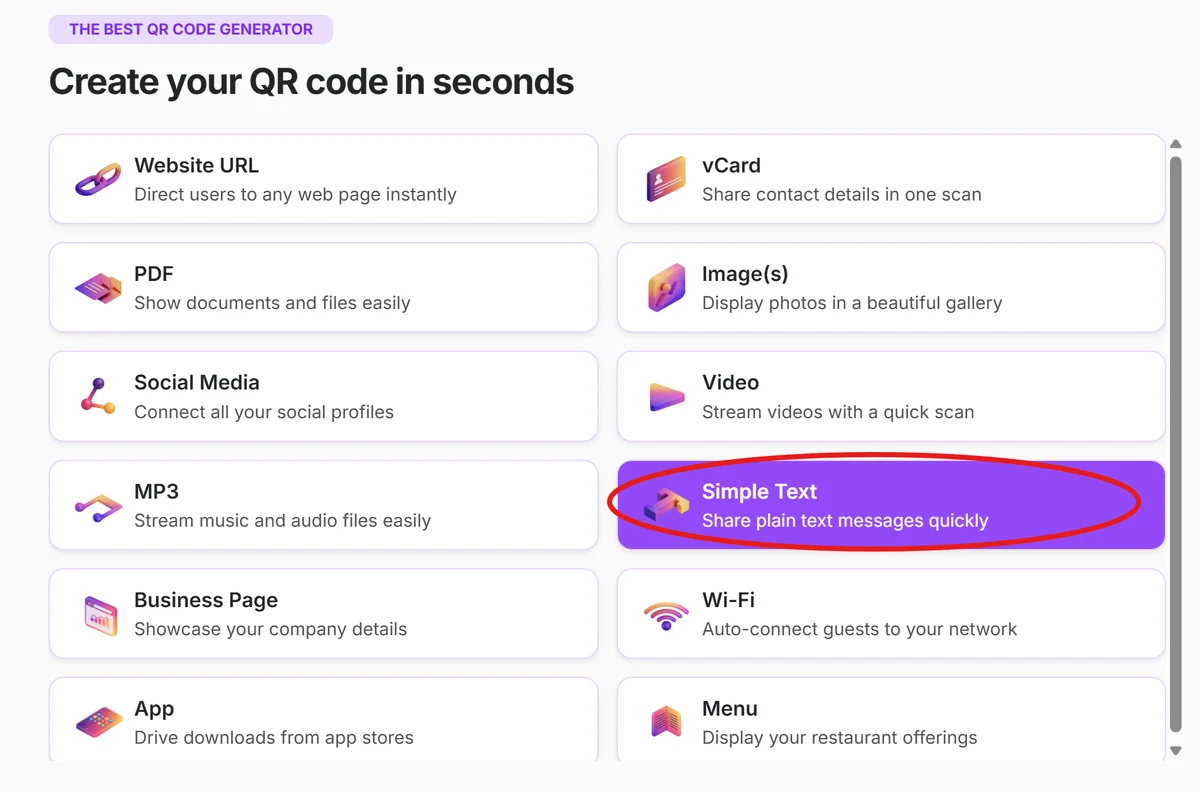
Navigate to qrcodeveloper.com and select the Text option from the QR code type menu. This opens the text input interface designed specifically for message-based codes.
Input your message content
Type or paste your text into the content field. This could be anything from a simple message to complex instructions, serial numbers, or detailed information that needs accurate transmission.
Format for readability
Structure longer text with line breaks, bullet points, or clear sections. Remember that users will read this on mobile screens, so organize information in digestible chunks with clear hierarchy.
Customize appearance and size
Adjust colors, add your logo, and set the appropriate size for your intended use. Consider where the code will be placed - business cards need smaller codes while posters can accommodate larger, more detailed designs.

Test and distribute strategically
Scan your code with multiple devices to verify the text displays correctly and remains readable. Then place codes where your audience expects to find information - near products, on handouts, or integrated into existing materials.
Best practices for text QR code design
Effective text QR codes balance information density with scannability. These practices help ensure your codes work reliably across different devices and situations.
Keep text concise but complete. Longer messages create denser QR codes that may be harder to scan, especially at smaller sizes. Aim for essential information that serves your specific purpose. Learn more about QR code design tips to optimize both appearance and functionality.
Use clear formatting with line breaks and spacing. Structure your text so it's immediately readable when displayed on a phone screen, with important information at the beginning.
Test character limits for your use case. While QR codes can technically store thousands of characters, practical scanning reliability decreases with very long texts, especially in poor lighting conditions.
Choose high contrast colors for outdoor or variable lighting conditions. Black on white remains the most reliable combination, but ensure any custom colors maintain sufficient contrast for consistent scanning.
Frequently Asked Questions
How much text can I include in a QR code?
QR codes can technically store up to 4,296 alphanumeric characters, but practical limits are much lower. For reliable scanning, keep text under 300 characters. Longer messages work but may require larger code sizes and better scanning conditions.
Can I edit the text after creating the QR code?
Static text QR codes cannot be edited once generated. If you need to change the content, you'll need to create a new code. For content that might need updates, consider using a URL QR code that points to a webpage you can edit instead.
Do text QR codes work offline?
Yes, text QR codes work completely offline. The text is stored directly in the code itself, so scanning doesn't require an internet connection. This makes them perfect for situations where connectivity might be limited.
What happens when someone scans a text QR code?
When scanned, the text appears directly in the scanner app or as a notification. Users can then copy the text, share it, or use it as needed. The experience is immediate - no loading times or redirects like with URL codes.
Are text QR codes free to create?
Yes, basic text QR codes are free to generate and use. You can create unlimited static text codes without any ongoing costs. Premium features like custom designs, analytics, or dynamic content may require paid plans.
Related Guides
Ready to create your QR code?
Generate custom QR codes in seconds - free and easy to use.
Create Free QR Code →