Pet ID tag QR codes for lost pet recovery

Replace traditional metal pet tags with scannable codes that instantly share your contact information when someone finds your lost pet.
Why QR codes make better pet ID tags
What if your pet's ID tag could share multiple phone numbers, your address, medical information, and even a recent photo - all without making the tag bulky or hard to read? Well, with a QR code, it can! Traditional pet ID tags only fit one phone number and maybe a name, but QR code pet tags can store unlimited contact details that update instantly when you move or change numbers. This flexibility makes them similar to dynamic QR codes that can be updated without reprinting.

A QR code pet ID tag works by linking to a digital profile containing all your pet's important information. When someone finds your lost pet, they simply scan the code with their smartphone camera to instantly access your contact details, your pet's name, medical needs, and any special instructions. The information appears immediately on their phone screen, making it faster and easier for good Samaritans to help reunite you with your furry family member. For those concerned about scanning unknown codes, it's worth understanding how to check if a QR code is safe before scanning.
Creating your pet's digital ID tag takes just minutes with QR Code Developer, and you can update the information anytime without ordering a new physical tag. Many pet owners also create contact information QR codes as backup methods for pet recovery.
Smart ways to use QR code pet tags
Pet owners are discovering creative applications for QR code ID tags beyond basic contact information. These digital tags solve common problems that traditional metal tags can't address, making pet recovery faster and more reliable. Consider these practical applications that work with QR code stickers or engraved tags.
Multi-contact emergency information
Include multiple phone numbers, your veterinarian's contact info, and backup contacts like family members or pet sitters who can help in emergencies.
Medical alert profiles
Share critical medical information like allergies, medications, or special needs that rescuers need to know immediately to keep your pet safe.
Temporary boarding updates
Update your contact information instantly when traveling or boarding your pet, without waiting for new tags to be engraved and shipped.
Reward and return instructions
Include reward information, specific return instructions, and even a recent photo to help identify your pet and encourage people to help with recovery efforts.
Setting up your pet's digital ID tag
Creating a QR code pet ID tag involves setting up a digital profile that contains all your pet's important information, then generating a code that links to that profile. The process is straightforward using a free QR code generator that allows you to customize the information and design.
Create your pet's digital profile
Start by visiting qrcodeveloper.com and choosing the contact information or URL option to create a landing page with your pet's details.
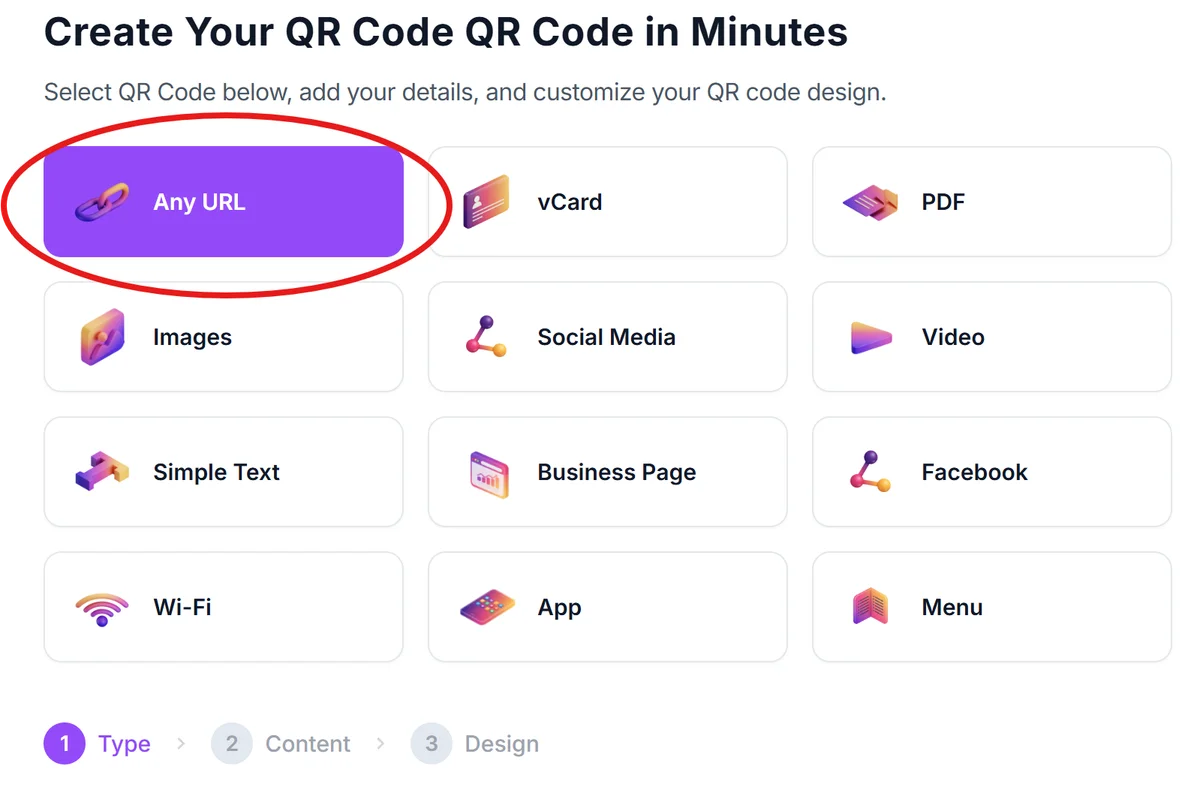
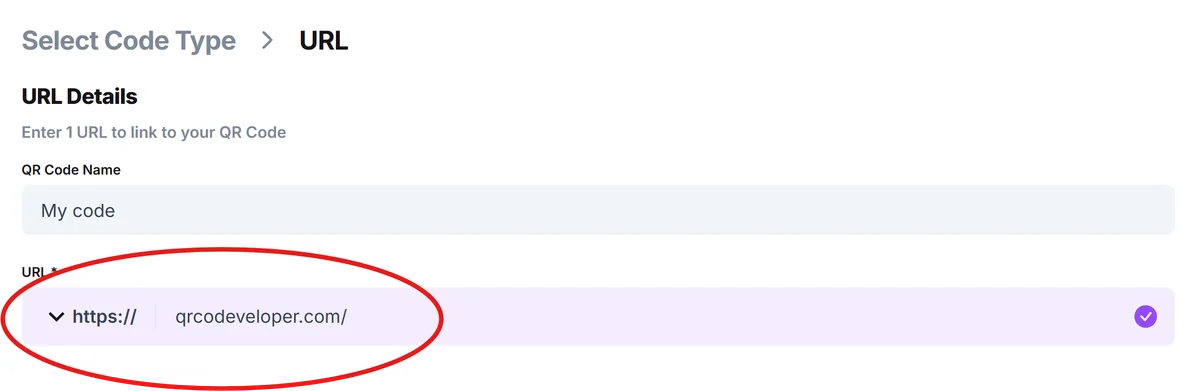
Add comprehensive contact details
Include multiple phone numbers, your address, email, and backup contacts. Add your pet's name, breed, age, and any medical information that rescuers should know.
Customize for visibility and durability
Click on the pencil icon in the Preview window to further customize your code. Choose high contrast colors (black on white works best) and make sure your QR code will be large enough to scan easily when printed on a pet tag. Following proper QR code design tips ensures maximum scannability in various lighting conditions.

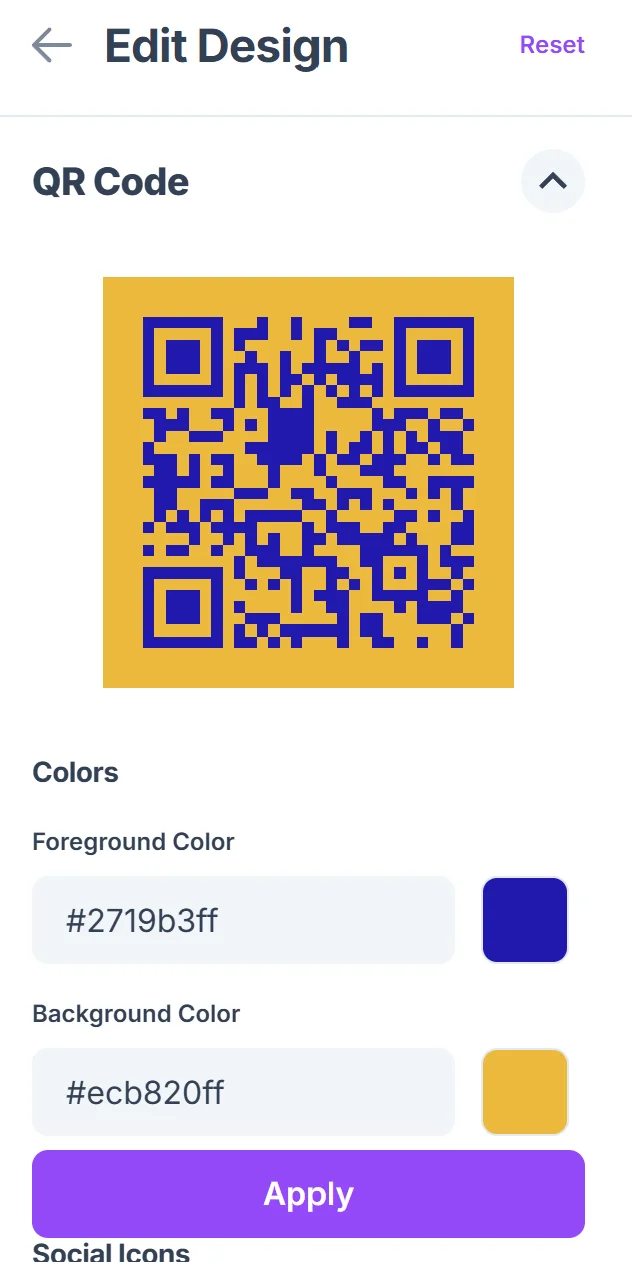
Test scanning in different conditions
Test your QR code by scanning it with multiple phones in various lighting conditions to ensure it works reliably when someone finds your pet.
Order your physical tag or apply stickers
Either have the QR code engraved on a durable pet tag or apply waterproof QR code stickers to your pet's existing collar for immediate protection.
Best practices for pet QR code tags
Follow these practical guidelines to make your pet's QR code tag as effective as possible for quick recovery and reunion.
Keep your information current by checking and updating your pet's digital profile every few months, especially after moves, phone number changes, or updates to medical needs
Use waterproof materials for outdoor pets and active dogs who swim or play in muddy conditions - laser engraving on metal tags lasts longer than printed stickers. For temporary solutions or testing, QR code stickers offer a quick and affordable way to get started with digital pet identification.
Make the QR code large enough to scan easily, typically at least 1 inch square on the tag, and ensure there's enough white space around the code for reliable scanning
Include both a QR code and traditional engraved contact information as backup, since not everyone knows how to scan QR codes or may have a dead phone battery
Frequently Asked Questions
Will people know how to scan a QR code on my pet's tag?
Most smartphone users can scan QR codes using their built-in camera app. You can also include simple text like 'Scan with phone camera' on the tag to provide guidance.
What happens if I need to update my contact information?
You can update your digital profile anytime without ordering a new physical tag. The QR code stays the same while the information it links to gets updated instantly.
Are QR code pet tags durable enough for active dogs?
Yes, when laser engraved on stainless steel or aluminum tags. Avoid printed stickers for very active pets and choose engraved options that won't fade or wear off.
Can I track when someone scans my pet's QR code?
Many QR code generators provide basic analytics showing when and where your code was scanned, which can help you know if someone has found your lost pet.
Do QR code pet tags cost more than traditional tags?
Initial costs are similar to traditional engraved tags, but QR codes save money long-term since you never need to order new tags when your contact information changes.
Related Guides
Ready to create your QR code?
Generate custom QR codes in seconds - free and easy to use.
Create Free QR Code →