Payment QR code generator for instant digital transactions

Accept payments instantly with scannable codes that connect customers to your preferred payment platforms in seconds.
How payment QR codes simplify digital transactions
What if you could eliminate the awkward dance of asking customers for their preferred payment method? Well, you can! Payment QR codes can connect your customers directly to your digital payment platforms - whether that's PayPal, Venmo, Cash App, or your business payment processor - with a simple scan.
A payment QR code contains a direct link to your payment platform, pre-filled with your account information and optionally the payment amount. When customers scan the code, their phone opens the payment app or webpage, ready to complete the transaction without typing account numbers or searching for your username.
These codes work with any payment platform that accepts URL-based transactions, from peer-to-peer apps like Zelle to professional services like Square and Stripe. Throughout this guide I'll show you how to create payment codes that work reliably across different devices and QR code types to match your business needs. So let's get started!
Where payment QR codes work best
Payment QR codes eliminate friction in transactions where cash handling is inconvenient or digital payments are preferred. Small businesses, service providers, and event organizers find them particularly valuable. You can also combine payment codes with QR code business cards for professional networking.
Small business transactions
Coffee shops, food trucks, and retail stores use payment codes at checkout to accept contactless payments without expensive card readers, similar to how QR code menus streamline the ordering process.
Service provider invoicing
Freelancers, consultants, and contractors include payment codes on invoices and estimates for immediate payment collection.
Event ticket sales and donations
Fundraisers, school events, and community organizations collect payments on-site without handling cash or checks.
Peer-to-peer transactions
Splitting restaurant bills, paying for shared expenses, or selling items on social media becomes instant with scannable payment links.
Building your payment QR code
Creating a payment QR code requires the correct URL format for your chosen payment platform. Each service has specific URL structures that ensure the payment opens correctly.
Open the QR code generator
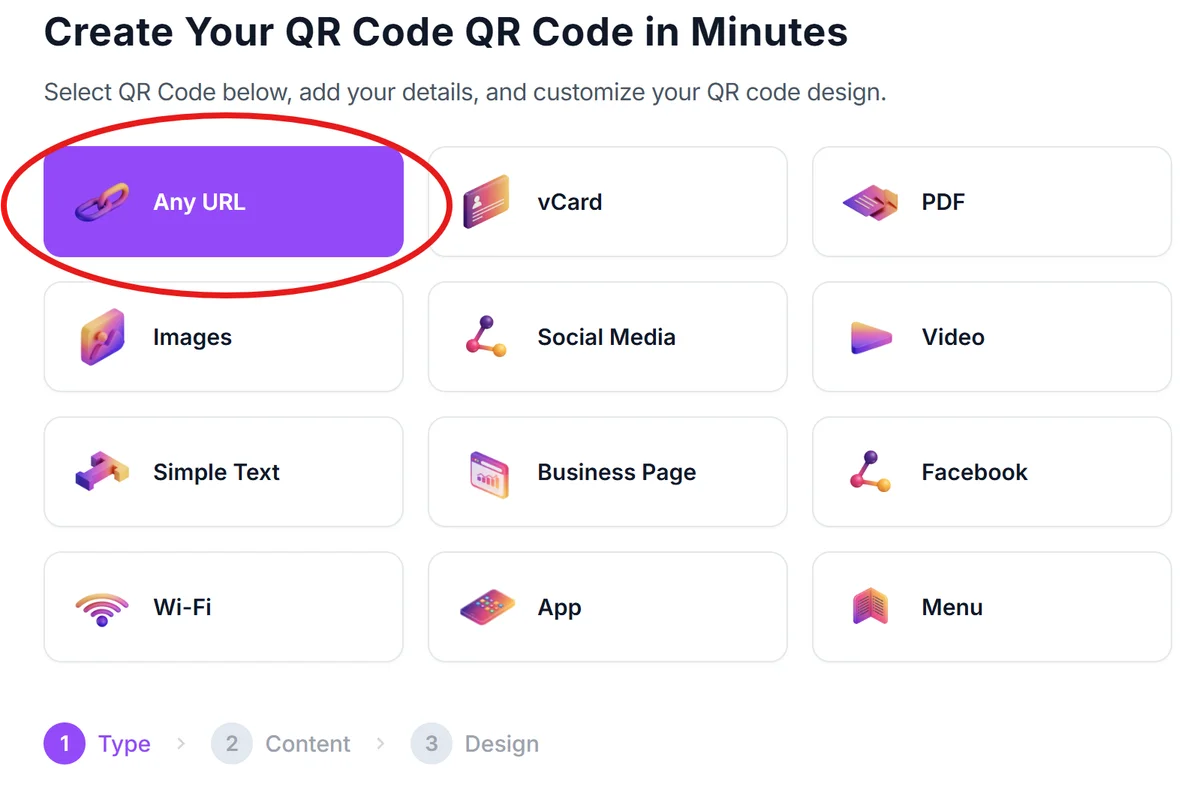
Visit qrcodeveloper.com and select the URL option, since payment codes link to your payment platform's web interface.
Format your payment URL
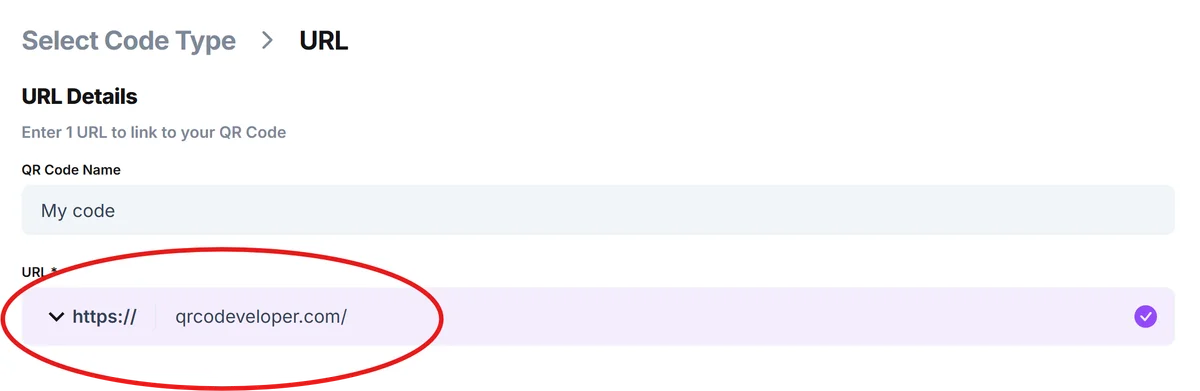
Enter your payment platform URL with the correct format. For PayPal, use paypal.me/yourusername. For Venmo, use venmo.com/yourusername. For Cash App, use cash.app/$yourusername.
Add amount parameters
Include specific amounts by adding parameters to your URL. PayPal uses /amount (like paypal.me/username/25), while Venmo uses ?amount=25 at the end of the URL.
Design for payment context
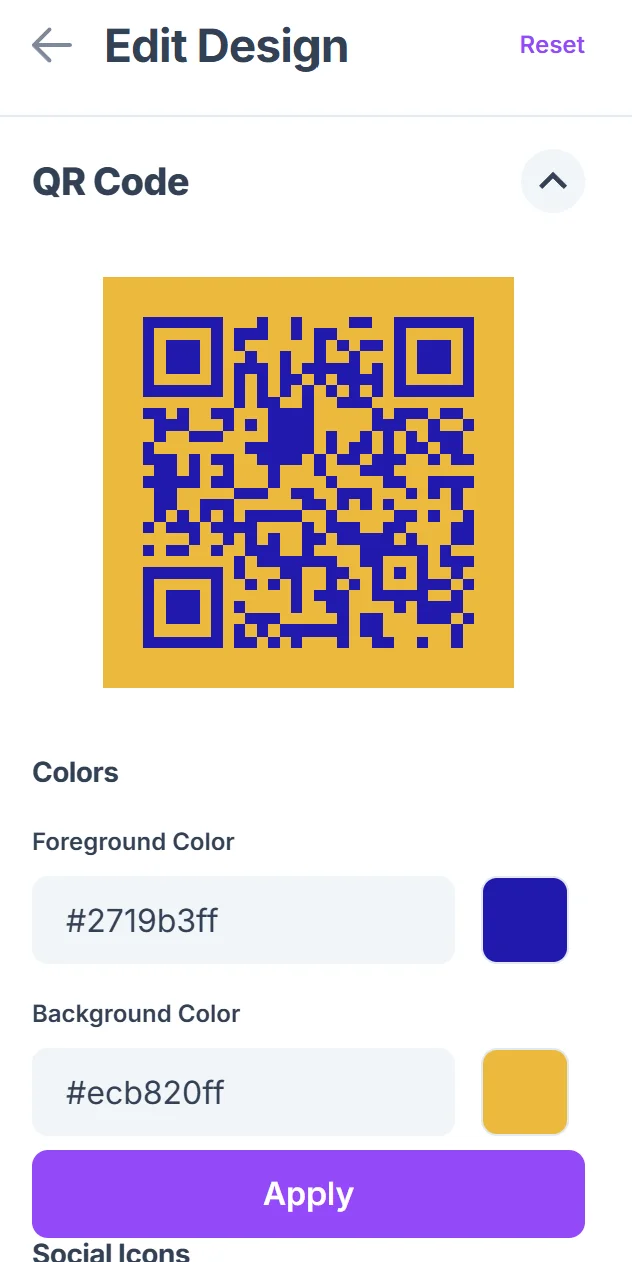
Choose colors that match your payment brand or business colors. Make the code large enough for easy scanning in payment situations, typically at least 1 inch square.

Test across payment apps
Scan your code with different devices to ensure it opens the correct payment interface and pre-fills the right information before sharing with customers.
Maximizing payment success rates
Payment QR codes work best when they're designed for your specific payment flow and customer behavior. Small adjustments can significantly improve completion rates.
Include clear signage explaining which payment apps the code supports, like 'Scan to pay with PayPal, Venmo, or Cash App' so customers know what to expect
Test your payment URLs regularly since payment platforms occasionally change their URL formats or add new features that affect QR code functionality. Consider using dynamic QR codes for easier updates when payment details change.
Position codes at natural decision points in your payment flow, such as next to the cash register or on invoices, rather than as an afterthought
Create separate codes for different payment amounts if you have standard pricing, rather than one generic code that requires customers to enter amounts manually
Frequently Asked Questions
Which payment platforms work with QR codes?
Most major payment platforms support URL-based payments that work with QR codes, including PayPal, Venmo, Cash App, Zelle, and business platforms like Square and Stripe. Each has specific URL formats for QR code integration.
Can I include a specific payment amount in the QR code?
Yes, most payment platforms allow you to pre-fill amounts in the URL. PayPal uses paypal.me/username/amount format, while others use URL parameters like ?amount=25 to specify the payment amount.
Do customers need the payment app installed to use the code?
It depends on the platform. Some payment services work through web browsers, while others require the specific app. PayPal works in browsers, but Venmo and Cash App typically require their mobile apps.
Are payment QR codes secure for business use?
Payment QR codes are as secure as the payment platform they link to. They don't store payment information in the code itself, just direct users to the secure payment platform where normal security measures apply.
Can I track payments made through QR codes?
Payment tracking happens within your payment platform's dashboard, not through the QR code itself. You'll see transactions in your PayPal, Venmo, or other platform accounts just like any other payment method.
Related Guides
Ready to create your QR code?
Generate custom QR codes in seconds - free and easy to use.
Create Free QR Code →