Livestorm QR code generator for webinar registration and attendance

Generate QR codes that link directly to your Livestorm webinars, boosting registration rates and making it simple for attendees to join sessions instantly.
Connecting QR codes with Livestorm webinars
Webinar hosts often rely on email reminders and manual link sharing to get attendees to join their sessions, but this can be complicated and frustrating. However, now they can create QR codes that instantly connect people to their Livestorm events with a simple scan. This shift has transformed how businesses approach webinar marketing and attendance, similar to how event QR codes have revolutionized event management across various industries.

A Livestorm QR code contains your webinar registration or join URL, allowing people to access your event instantly from any smartphone or tablet. When scanned, the code opens the registration page or takes attendees directly into the live session, depending on how you've configured it. This removes friction from the joining process and makes it easier for people to participate in your webinars.
In this guide I will cover everything you need to know about creating and using QR codes for your Livestorm webinars. I'll explore practical applications, creation steps, and best practices to maximize your event attendance. You can also learn about other event QR code strategies to enhance your overall event marketing approach. So let's get the show started!
Practical applications for Livestorm QR codes
Livestorm QR codes solve the common problem of low webinar attendance and complicated joining processes. They make it effortless for people to register or join your sessions from any location. Consider exploring QR codes on flyers to promote your webinars through printed materials as well.
Conference and trade show promotion
Display QR codes on booth banners and handouts to let visitors register for your upcoming webinars instantly, capturing leads while interest is high.
Social media campaign integration
Share QR codes in Instagram stories, LinkedIn posts, and Facebook ads to drive webinar registrations without requiring followers to type long URLs.
Print marketing materials
Add QR codes to business cards, brochures, and direct mail pieces to bridge offline marketing with online webinar attendance.
Employee training and onboarding
HR teams use QR codes to simplify access to mandatory training webinars, ensuring new hires can easily join orientation sessions from their mobile devices.
Creating QR codes for your Livestorm events
Building QR codes for your Livestorm webinars takes just a few minutes and can significantly increase your attendance rates.
Access your webinar URL from Livestorm
Log into your Livestorm account and navigate to your webinar. Copy either the registration URL (for upcoming events) or the join URL (for live sessions). Then visit qrcodeveloper.com to start creating your QR code.
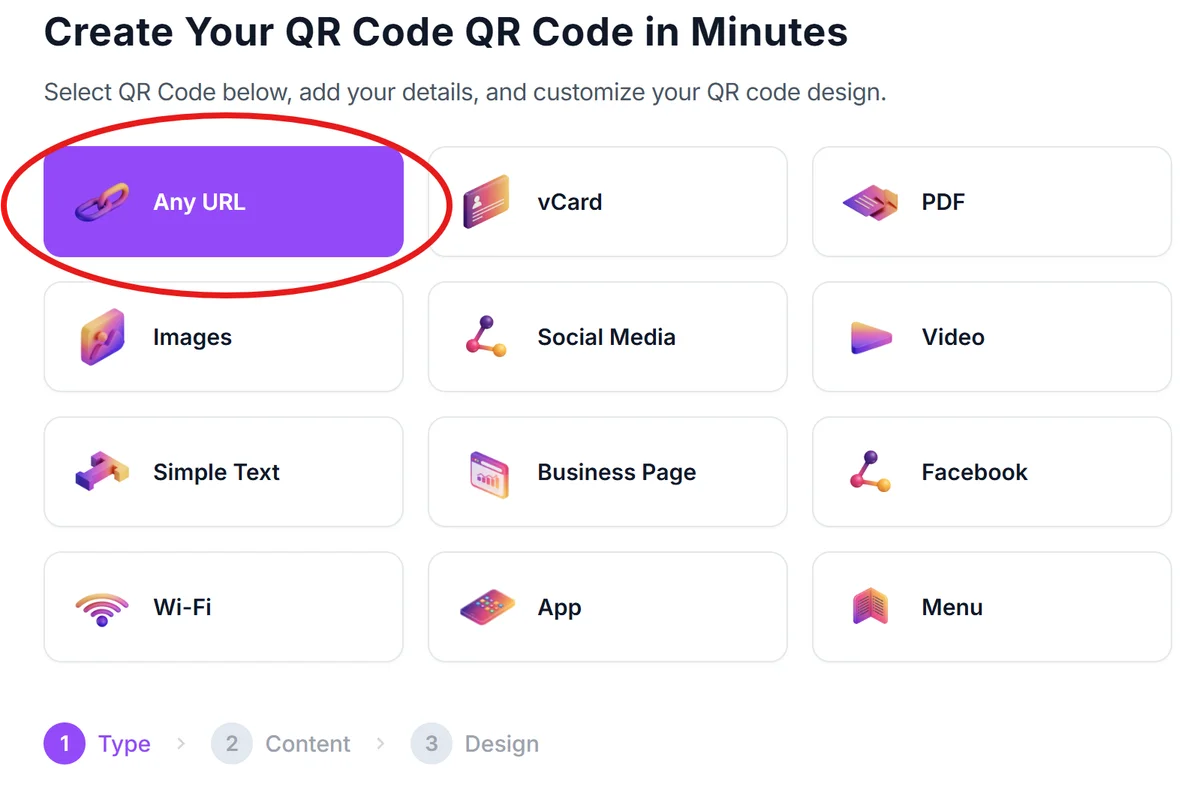
Enter your Livestorm webinar link
Paste your copied Livestorm URL into the generator. Make sure you're using the correct link type - registration URLs for pre-event promotion and join URLs for day-of-event access.
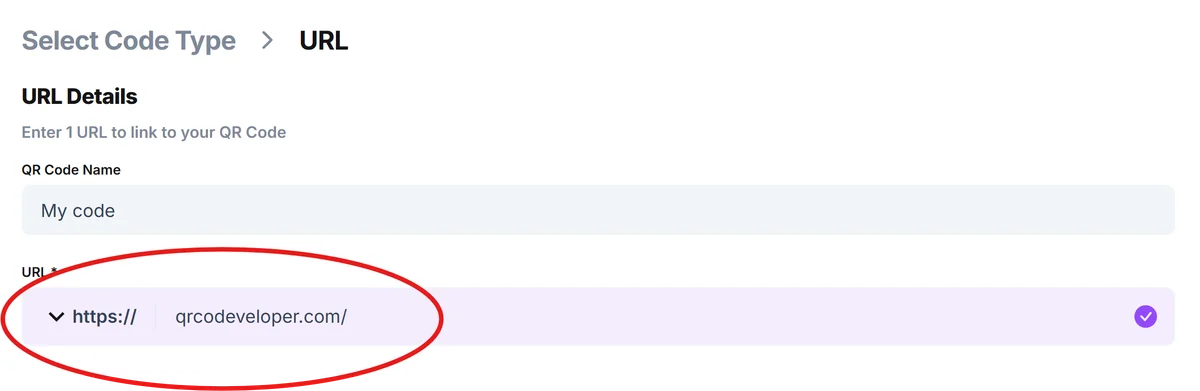
Customize for professional webinar branding
Click on the pencil icon in the Preview window to further customize your code. Add your company colors and logo to match your webinar branding. Consider using your brand's primary color scheme to maintain consistency across all marketing materials, following proven QR code design principles for maximum effectiveness.

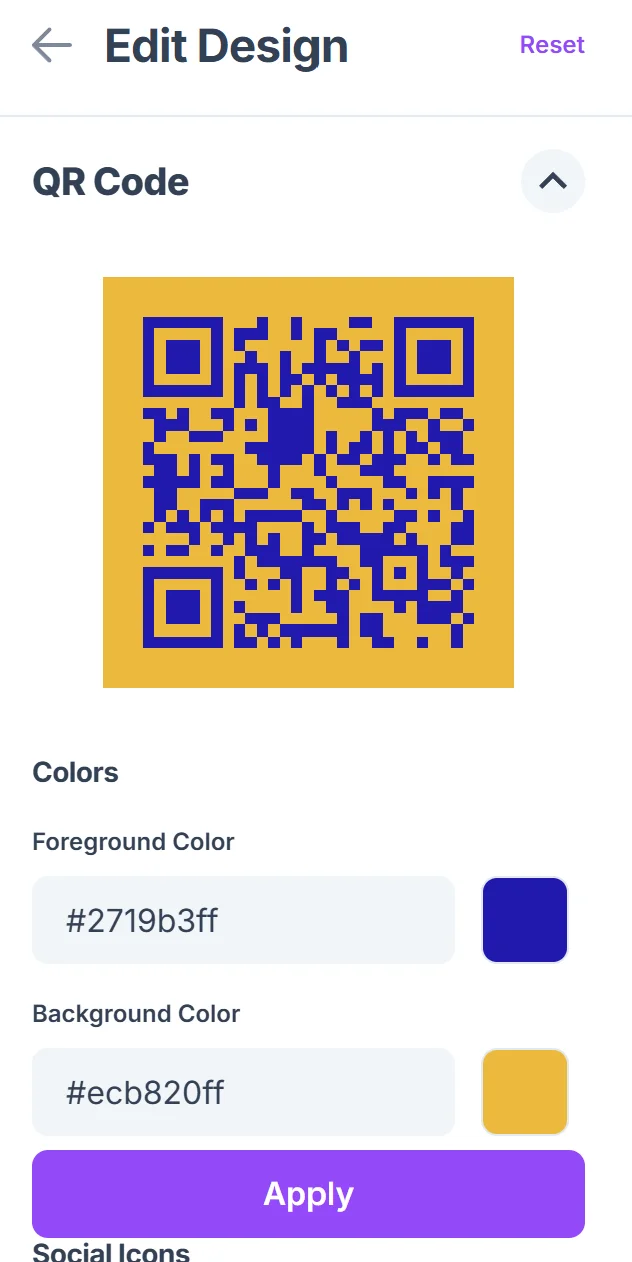
Test with webinar scenarios in mind
Scan your QR code on different devices to ensure it works properly for various attendee situations - both for pre-registration and live session joining.
Deploy across your webinar marketing channels
Download your QR code and add it to presentation slides, email signatures, social media posts, and any printed materials you're using to promote your webinar.
Best practices for webinar QR code success
These proven strategies will help you get the most from your Livestorm QR codes and improve your webinar attendance rates.
Include clear context around your QR codes by adding text like 'Scan to register for our product demo' or 'Join our live training session' so people know exactly what they're accessing. This transparency also helps with QR code safety by building user trust.
Create separate QR codes for different webinar series - use unique codes for product demos, training sessions, and company updates to track which content types generate the most interest
Consider the timing of your QR code campaigns - share registration QR codes early in your marketing cycle, but switch to join URLs closer to the event date for immediate access
Place QR codes at eye level on printed materials and ensure they're large enough to scan easily from a reasonable distance, especially important for conference displays and booth materials
Frequently Asked Questions
Can I use the same QR code for both webinar registration and joining the live session?
No, you'll need different QR codes since Livestorm provides separate URLs for registration and joining. Use registration URLs for pre-event promotion and join URLs for day-of-event access.
Do QR codes work for recurring Livestorm webinars?
Yes, but you'll need to create new QR codes for each session since Livestorm generates unique URLs for each webinar occurrence, even in a recurring series.
Can I track how many people scan my Livestorm QR codes?
While basic QR code generators don't provide scan analytics, you can track registrations and attendance through Livestorm's built-in analytics to measure the effectiveness of your QR code campaigns.
What happens if someone scans the QR code after the webinar ends?
This depends on your Livestorm settings. If you've enabled replay access, they'll be able to view the recorded session. Otherwise, they'll see a message that the webinar has ended.
Are QR codes for Livestorm webinars free to create?
Yes, you can create QR codes for your Livestorm webinars at no cost using free generators. The codes will work as long as your Livestorm URLs remain active.
Related Guides
Ready to create your QR code?
Generate custom QR codes in seconds - free and easy to use.
Create Free QR Code →