QR codes for itinerary management and travel planning

Share complete travel plans, booking details, and schedule updates instantly with scannable codes that keep everyone informed.
How travel planners use QR codes for itinerary sharing
Travel agents report spending up to 30% of their time answering basic questions about bookings and schedules that clients could access themselves. Group travel coordinators face even bigger challenges when managing multiple travelers who need constant updates about flight changes, meeting points, and activity schedules. Luckily, QR codes can help out and make everything far easier!

Itinerary management QR codes solve this communication bottleneck by linking directly to your complete travel plans, booking confirmations, contact information, and real-time updates. Instead of sending lengthy emails or managing multiple messaging threads, travelers scan one code to access everything they need for their trip. You can learn more about different types of QR codes to determine which format works best for your travel documents.
Travel professionals are discovering that QR codes work particularly well for group tours, corporate travel, and family vacations where multiple people need access to the same information. In this guide I'll show you how to create codes that connect to your travel documents and keep everyone on the same page throughout the journey. You can also explore our PDF QR code guide for converting detailed itineraries into scannable formats. So let's get started!
Practical applications for travel itinerary QR codes
Travel organizers use these QR codes to eliminate confusion and reduce repetitive questions from travelers. The codes work especially well when printed on luggage tags, welcome packets, or booking confirmations. Our event QR code guide covers similar organizational strategies for scheduled activities.
Group tour coordination
Tour operators place QR codes on welcome packets that link to complete schedules, emergency contacts, and daily meeting points for all tour participants.
Corporate travel management
Business travel coordinators create codes linking to expense policies, approved hotels, transportation options, and meeting schedules for traveling employees.
Family vacation planning
Family trip organizers share codes that connect to shared Google Docs with flight details, accommodation addresses, activity bookings, and packing lists. For location-specific information, consider using QR codes for Google Maps to provide direct navigation to hotels and attractions.
Wedding destination planning
Wedding planners include QR codes on save-the-dates that link to travel information, hotel blocks, local recommendations, and weekend schedules for guests. Our wedding invite QR codes guide provides additional strategies for incorporating codes into wedding communications.
Creating QR codes for your travel documents
Setting up itinerary QR codes takes just a few minutes once you have your travel information organized in a shareable format.
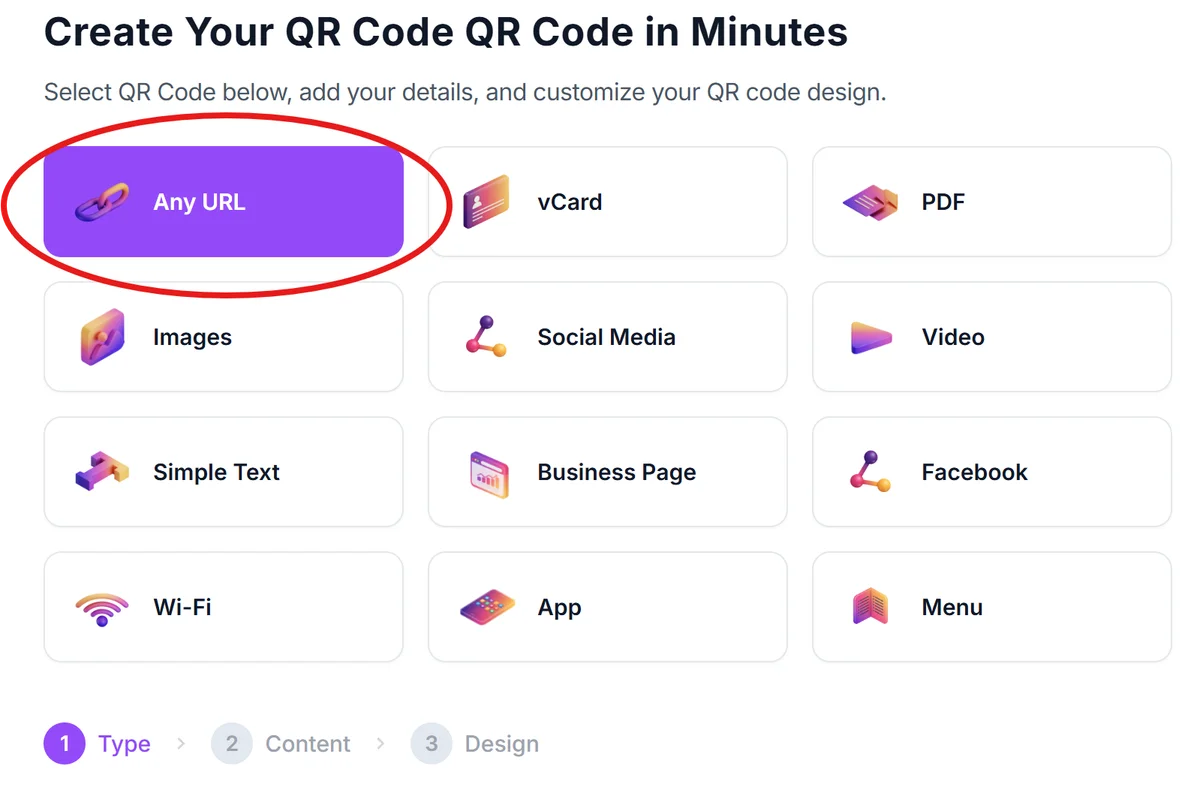
Visit the QR code generator
Go to qrcodeveloper.com and select the URL option if linking to online documents, or choose PDF if you want to upload travel documents directly.
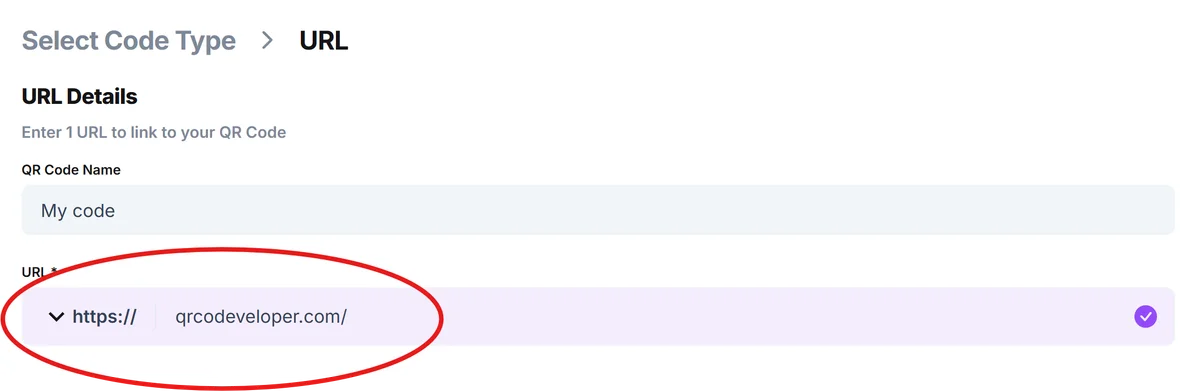
Enter your itinerary link or upload documents
Paste the URL to your Google Doc, shared calendar, or travel website. Alternatively, upload PDF files containing your complete itinerary, booking confirmations, and contact information.
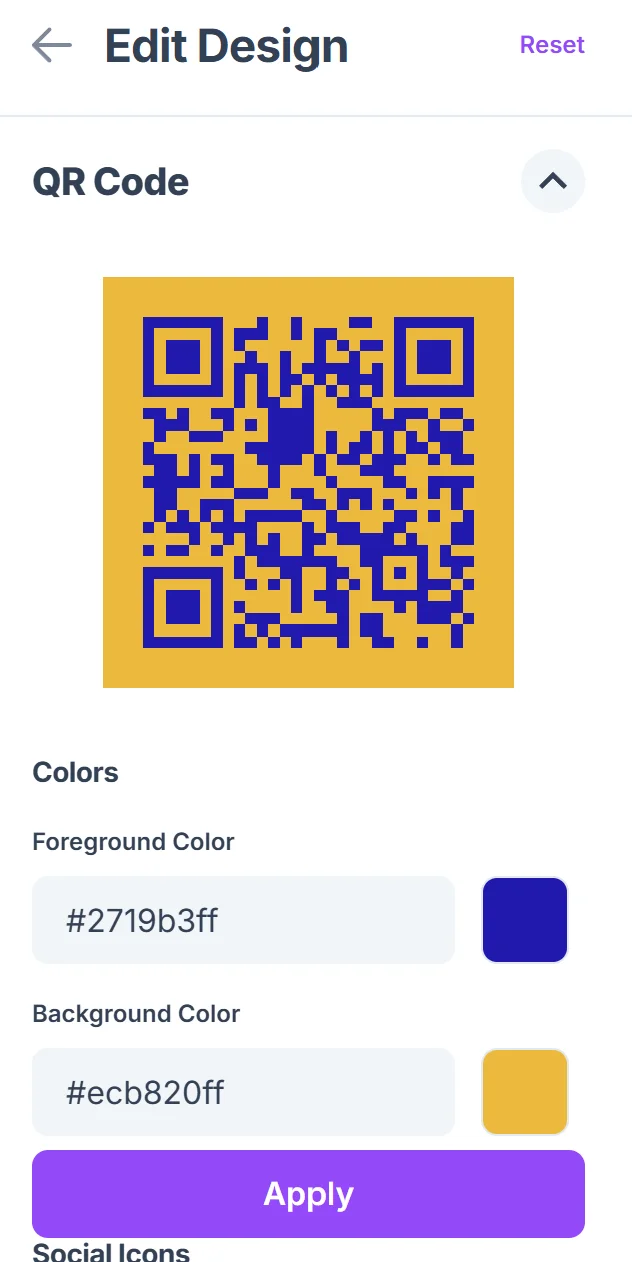
Customize for easy recognition
Click on the pencil icon in the Preview window to further customize your code. Add your travel dates or destination name to the QR code design. Choose colors that match your travel documents or company branding for professional consistency.

Test with multiple devices
Scan your code with different smartphones to ensure the documents load properly and are readable on various screen sizes, especially for detailed itineraries.
Distribute to all travelers
Print codes on luggage tags, booking confirmations, or welcome packets using QR code stickers for durable, weather-resistant options. Email digital versions to travelers who prefer to save codes on their phones for offline access.
Best practices for travel QR code management
These strategies help ensure your travel QR codes remain useful throughout the entire trip and don't create more confusion for travelers.
Keep linked documents updated in real-time, especially for flight changes, meeting point adjustments, or weather-related schedule modifications that affect the entire group
Include offline backup information directly on printed materials in case travelers can't access the QR code content due to poor internet connectivity at destinations
Use descriptive file names and clear document organization when linking to multiple travel documents, making it easy for travelers to find specific information quickly
Test QR codes with travelers who have different smartphone types and technical comfort levels to ensure everyone can access the information successfully
Frequently Asked Questions
Can I update my itinerary information after creating the QR code?
Yes, if you link to online documents like Google Docs or shared calendars, you can update the information anytime and travelers will see the changes when they scan the code.
What's the best format for sharing detailed travel itineraries?
Google Docs work well for collaborative itineraries, while PDF uploads are better for finalized documents with booking confirmations and official travel information.
How can I make sure all travelers can access the QR code content?
Test your QR codes with different devices and provide both printed and digital versions. Include basic information directly on printed materials as a backup.
Do QR codes work internationally for travel documents?
Yes, QR codes work globally as long as travelers have internet access. Consider including offline-accessible information for destinations with limited connectivity.
Is there a limit to how much travel information I can include?
QR codes can link to documents of any size, but organize information clearly with sections for flights, accommodations, activities, and emergency contacts for better usability.
Related Guides
Ready to create your QR code?
Generate custom QR codes in seconds - free and easy to use.
Create Free QR Code →