Insurance QR code generator for policy documents and claims

Connect policyholders to their insurance information instantly with scannable codes that eliminate paperwork hassles and phone wait times.
How insurance companies use QR codes for customer service
Everyday, more and more insurance companies are embracing QR code technology to give policyholders instant access to their coverage details, claims forms, and contact information. This shift toward mobile-first solutions addresses the common frustration of hunting through paperwork or waiting on hold when you need policy information quickly. QR codes are becoming the bridge between traditional insurance documents and the convenience customers expect from digital services.

Insurance QR codes can provide instant access to policy documents, claims forms, customer portals, and support resources. When scanned, these codes can direct customers to their specific policy details, initiate claims processes, or connect them directly to their agent's contact information.
This approach transforms how insurance companies interact with their customers, reducing administrative overhead while improving satisfaction scores. Our QR code generator helps insurance professionals create secure, trackable codes for various customer touchpoints throughout the policy lifecycle.
Insurance QR code applications across the industry
Insurance companies deploy QR codes across multiple customer interaction points to reduce friction and improve service delivery. These applications span from initial policy enrollment to claims resolution, creating a more connected insurance experience. Learn more about secure implementation in our QR code safety guide.
Policy document access
Link directly to digital policy documents, allowing customers to access coverage details, beneficiary information, and renewal dates without logging into multiple systems.
Claims reporting and tracking
Enable quick claims initiation by scanning codes on insurance cards or accident report forms, directing customers to pre-filled claim forms or photo upload portals.
Agent contact and scheduling
Connect policyholders directly to their assigned agent's calendar, contact information, or video consultation booking system for personalized service.
Emergency assistance and roadside support
Provide immediate access to emergency hotlines, roadside assistance requests, or location-based service provider networks during critical situations.
Building QR codes for insurance documents and services
Creating insurance QR codes requires attention to security and compliance while maintaining user accessibility. The process involves selecting the right content type and configuring appropriate access controls.
Access the QR code generator platform
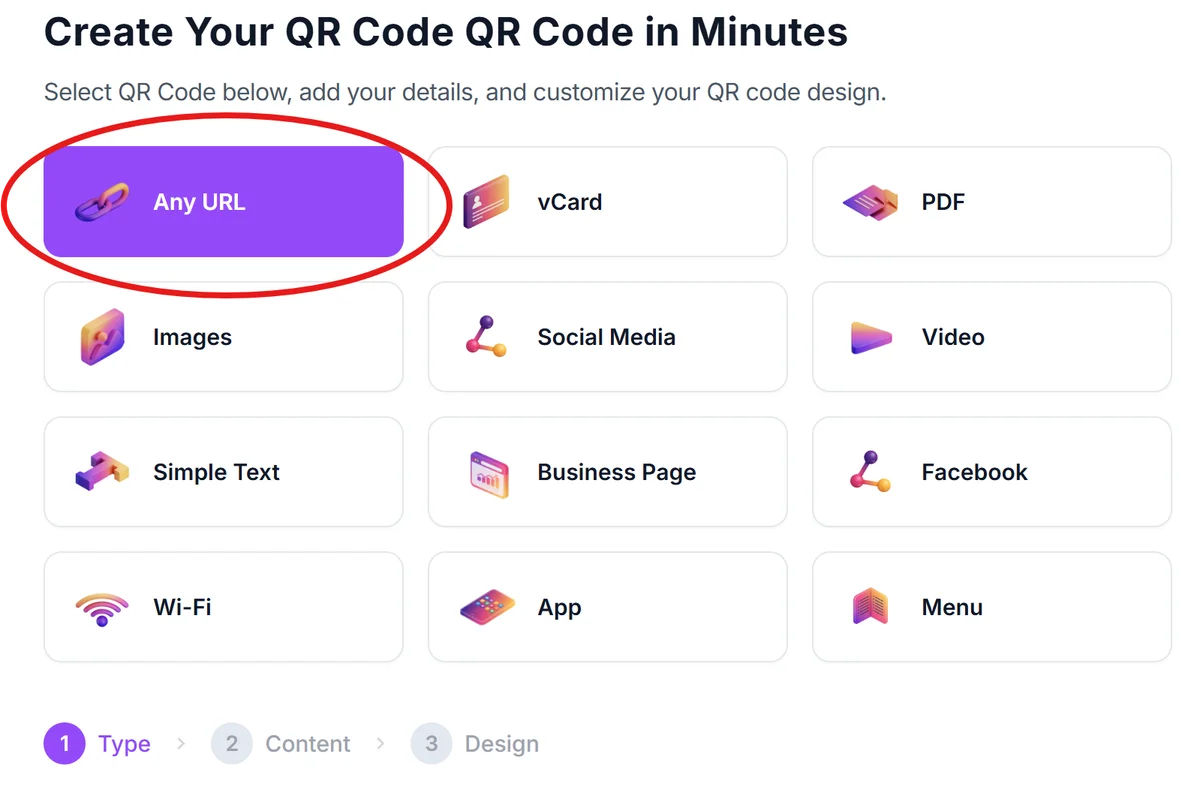
Visit qrcodeveloper.com and select the URL option for linking to your insurance portal, document repository, or customer service platform.
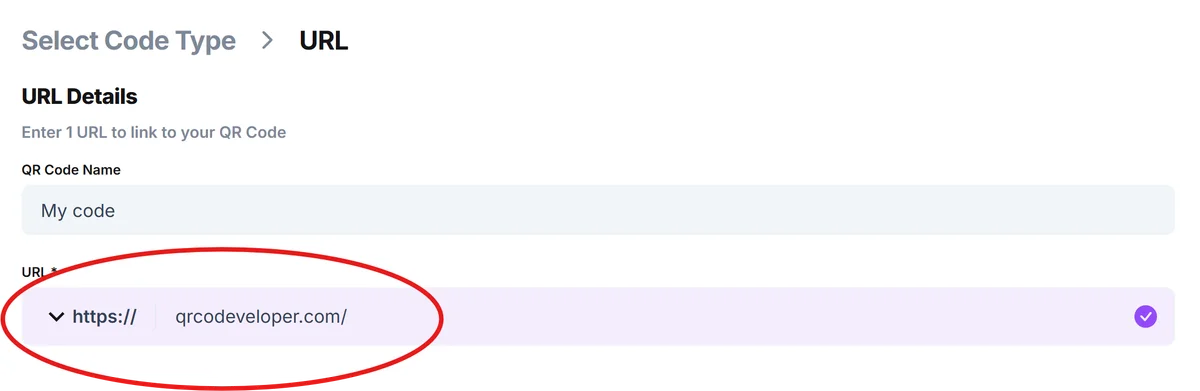
Enter your insurance portal URL
Input the specific URL for your customer portal, policy document library, claims system, or agent contact page. Ensure the destination requires appropriate authentication for sensitive information.
Configure professional branding
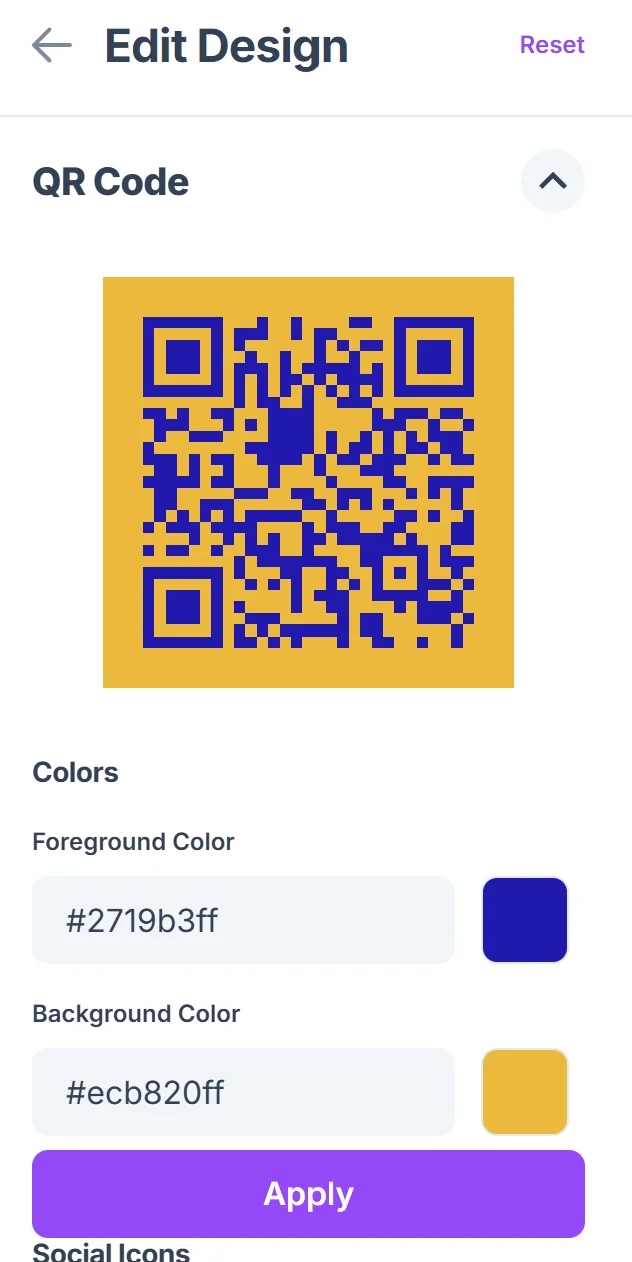
Click on the pencil icon in the Preview window to further customize your code. Customize the QR code with your insurance company's colors and add your logo for brand recognition. Choose high contrast colors for reliable scanning across different lighting conditions, following our QR code design tips.

Test across customer scenarios
Verify the QR code works correctly on various devices and leads to the intended destination. Test both the scanning experience and the subsequent login or information access process.
Deploy with clear instructions
Place QR codes on policy documents, insurance cards, or marketing materials with clear explanations of what customers will access when they scan.
Insurance QR code best practices for security and compliance
Insurance QR codes must balance accessibility with security requirements, ensuring customer data protection while providing convenient access to policy information and services.
Always link to secure, authenticated portals rather than displaying sensitive policy information directly - protect customer privacy while maintaining convenience
Include clear labeling next to QR codes explaining what information customers will access, such as 'Scan to view your policy documents' or 'Quick claims reporting'
Use separate QR codes for different functions (policy access, claims, agent contact) to track usage patterns and identify which services customers use most frequently
Regularly audit QR code destinations to ensure links remain active and secure, especially after system updates or portal changes that might affect accessibility
Frequently Asked Questions
Can QR codes contain actual policy information or just links?
For security and compliance reasons, insurance QR codes should link to secure portals rather than containing sensitive policy data directly. This protects customer information while providing convenient access.
How do I ensure QR codes comply with insurance data protection regulations?
Link QR codes to authenticated systems that require proper login credentials. Never embed personal information directly in the QR code itself, and ensure destination websites meet your industry's security standards.
What's the best placement for QR codes on insurance documents?
Place QR codes prominently on insurance cards, policy summaries, and claims forms where customers expect to find quick access information. Avoid cluttering important policy text or legal disclosures.
Do all smartphones scan QR codes reliably for insurance purposes?
Modern smartphones (iPhone and Android from the last 5 years) have built-in QR code scanning through their camera apps. For older devices, customers can download free QR scanner apps from their app store.
Are there costs associated with creating insurance QR codes?
Basic QR code generation is free, though some advanced features like detailed analytics or dynamic codes that can be updated may require paid plans depending on your volume and tracking needs.
Related Guides
Ready to create your QR code?
Generate custom QR codes in seconds - free and easy to use.
Create Free QR Code →