QR codes for delivery tracking and package monitoring

Bridge the gap between shipping labels and real-time package visibility with trackable QR codes that customers can scan anywhere.
How QR codes transform package tracking experiences
What if customers could skip the hassle of typing tracking numbers and instantly check their package status with a simple scan? Well, with QR codes, they can! Traditional delivery tracking requires customers to dig through emails, copy long tracking numbers, and navigate to carrier websites. QR codes solve these problems by connecting orders directly to tracking information through a single scan.
Delivery tracking QR codes work by encoding your package's tracking URL or unique identifier into a scannable code. When customers scan the code with their phone camera, they're immediately taken to the tracking page showing real-time shipment status, estimated delivery times, and location updates. This creates a seamless connection between physical packages and digital tracking information.
These codes work across all major shipping carriers and can be customized to match your brand while providing instant access to tracking data. Our QR Code Developer platform makes it simple to create tracking codes that work with any carrier's system, whether you're shipping through FedEx, UPS, USPS, or regional delivery services. Learn about QR code design best practices to ensure your tracking codes are both functional and visually appealing.
Real-world applications for delivery tracking QR codes
Businesses across industries use delivery tracking QR codes to reduce customer service inquiries and improve the delivery experience. From e-commerce to pharmaceuticals, these codes solve the universal problem of package visibility. Learn more about different applications in our parcel tracking guide.
E-commerce order fulfillment
Online retailers add QR codes to shipping labels and packing slips, letting customers track orders without logging into accounts or searching through emails. Many businesses also include these codes on business cards to provide easy access to order status pages.
Pharmaceutical and medical deliveries
Healthcare companies use tracking QR codes for temperature-sensitive medications and medical supplies, providing patients with delivery updates and handling instructions.
Food and grocery delivery services
Meal kit companies and grocery delivery services include QR codes that show real-time delivery progress, estimated arrival times, and driver contact information.
Business-to-business shipping
B2B companies attach tracking QR codes to shipments, allowing receiving departments to quickly check delivery status and prepare for incoming inventory.
Building your delivery tracking QR code system
Creating delivery tracking QR codes involves connecting your shipping system with scannable codes that update automatically as packages move through the delivery network.
Set up your tracking URL structure
Visit qrcodeveloper.com and determine how your tracking URLs will be formatted. Most carriers use a pattern like 'carrier.com/track?number=TRACKINGNUMBER' that you can standardize across shipments.
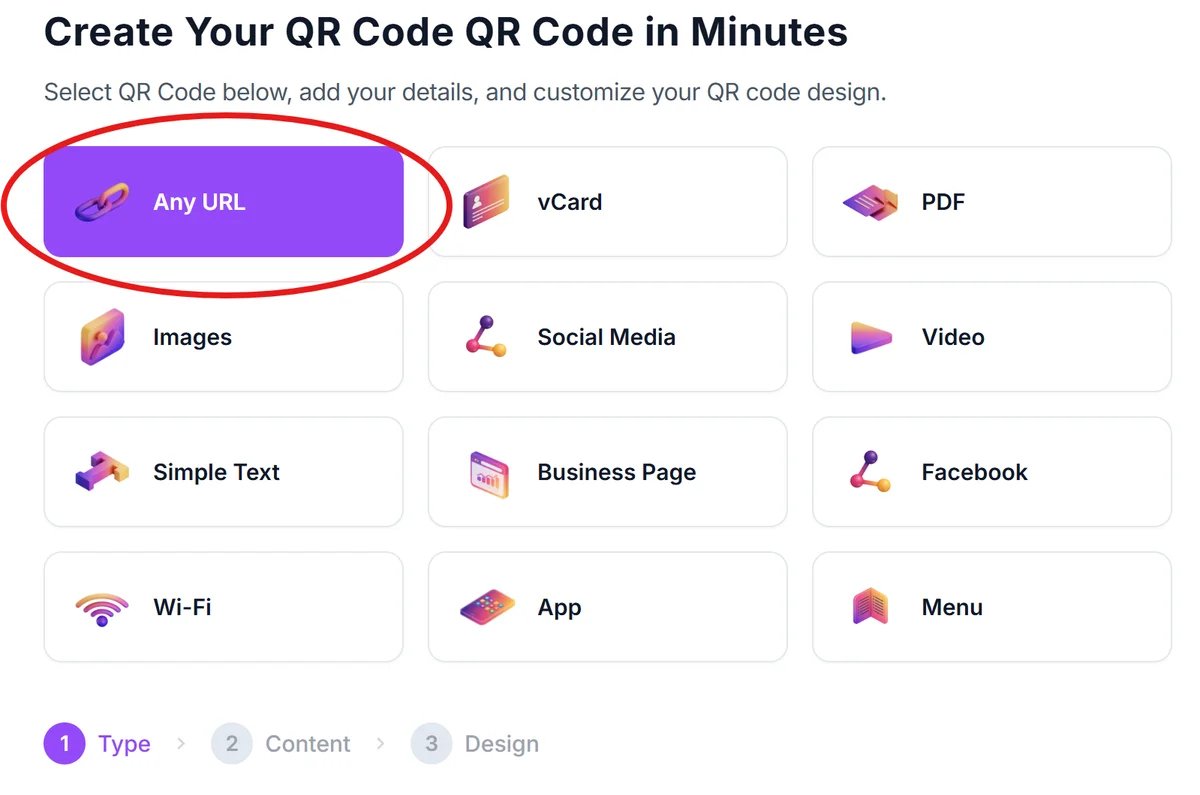
Generate QR codes for tracking numbers
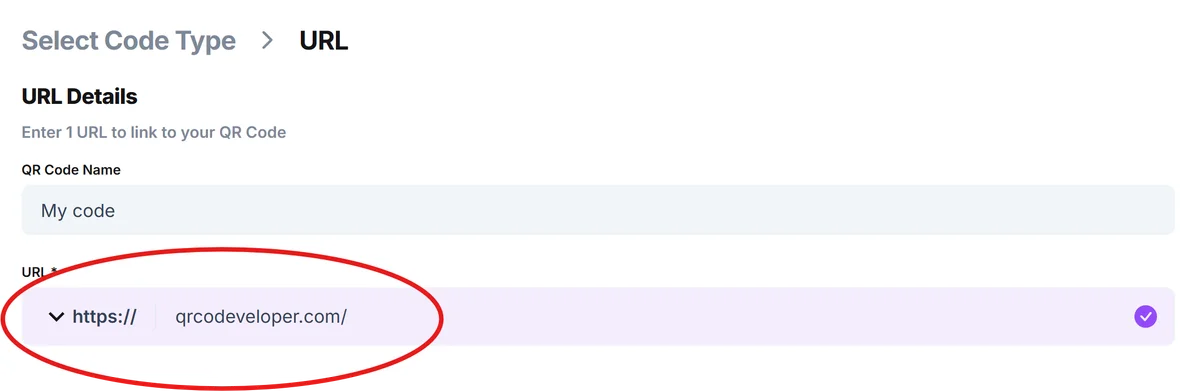
Input your complete tracking URL into the generator. For dynamic tracking, use a redirect URL that updates based on the tracking number, or create individual codes for each shipment.
Brand your tracking codes
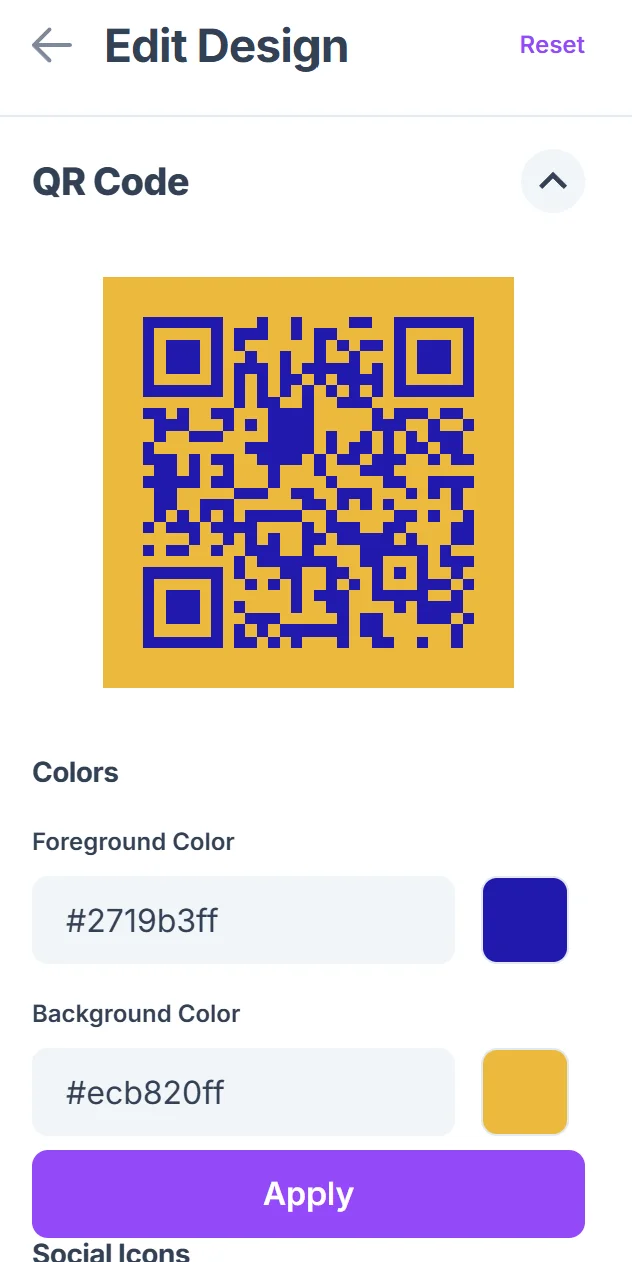
Click on the pencil icon in the Preview window to further customize your code. Customize the QR code design with your company colors and logo. Add clear instructions like 'Scan to track your package' so customers understand the code's purpose immediately. Consider creating QR code stickers for packages that need additional tracking visibility.

Integrate codes into shipping workflow
Print QR codes on shipping labels, packing slips, or confirmation emails. Position them prominently where customers will notice them when receiving or checking on packages.
Test tracking functionality
Verify that codes work across different devices and link correctly to tracking information. Test with actual tracking numbers to ensure the customer experience is smooth and informative.
Best practices for tracking QR code implementation
Successful delivery tracking QR codes require thoughtful placement, clear instructions, and reliable linking to ensure customers can easily access their package information.
Size QR codes appropriately for your shipping materials - aim for at least 1 inch square to ensure reliable scanning even on smaller packages or when labels get slightly damaged during transit.
Include fallback tracking information alongside the QR code, such as the tracking number itself, so customers have alternatives if they can't scan the code.
Position QR codes on shipping labels where they won't be covered by additional handling stickers or damaged during the shipping process.
Add contextual instructions like 'Scan for live tracking updates' to help customers understand what the code does, especially those unfamiliar with QR code functionality.
Frequently Asked Questions
Can I create one QR code that works for multiple tracking numbers?
You can create a dynamic QR code that redirects to different tracking pages based on parameters, but most businesses create individual codes for each shipment to ensure accurate tracking.
Do delivery tracking QR codes work with all shipping carriers?
Yes, QR codes work with any carrier as long as you have the correct tracking URL format. The code simply directs users to the carrier's tracking page with the appropriate tracking number.
How do I handle tracking codes for international shipments?
For international deliveries, ensure your QR codes link to tracking pages that show customs clearance and international transit updates, not just domestic carrier information.
What happens if a customer scans the code before the package is in the system?
The tracking page will typically show 'label created' or 'information received' status. Most carriers update their systems within a few hours of label creation.
Are there any costs associated with creating delivery tracking QR codes?
Basic QR code generation is free, but you may want dynamic codes for advanced features like analytics or the ability to update tracking information without reprinting codes.
Related Guides
Ready to create your QR code?
Generate custom QR codes in seconds - free and easy to use.
Create Free QR Code →