Conference QR codes for event management and networking

Bridge the gap between physical conferences and digital engagement with scannable codes that connect attendees instantly.
How QR codes transform conference experiences
Conference attendees are increasingly abandoning traditional networking methods in favor of instant digital connections that eliminate the hassle of lost business cards and outdated paper materials. This shift toward contactless information sharing has transformed how professionals exchange details and access real-time event updates. Because of this shift, QR codes have emerged as the preferred bridge between physical conference experiences and digital convenience.
Conference QR codes solve these pain points by creating instant digital bridges between attendees, speakers, and event content. When someone scans a QR code at your conference, they can immediately access speaker profiles, session materials, networking contacts, or real-time schedule updates without fumbling through apps or paper handouts.
These scannable codes work across every smartphone camera, making them accessible to all attendees regardless of their technical expertise. From registration check-ins to post-event surveys, event QR codes create seamless touchpoints that keep your conference running smoothly while providing valuable analytics on attendee engagement.
Conference QR code applications that work
Smart conference organizers use QR codes to eliminate friction points that traditionally slow down events and frustrate attendees. These practical applications address real conference challenges while gathering valuable data. Check out our QR code business cards guide for networking-focused implementations.
Instant networking and contact exchange
Attendees scan codes on name badges or business cards to instantly save contact information, LinkedIn profiles, and personal websites to their phones.
Session materials and presentation access
Speakers display QR codes on their slides that link directly to presentation files, additional resources, or follow-up surveys for immediate audience engagement.
Real-time schedule updates and navigation
Conference maps and schedule boards feature QR codes that provide live updates on room changes, speaker substitutions, and time modifications.
Feedback collection and survey distribution
Post-session QR codes on exit signs or presentation screens capture immediate feedback through online surveys while experiences are fresh in attendees' minds.
Setting up conference QR codes step-by-step
Creating effective conference QR codes requires planning for different use cases and ensuring they work reliably under conference conditions.
Choose your QR code generator platform
Visit qrcodeveloper.com and select the type of content you want to share - whether it's contact information, URLs, or downloadable files.
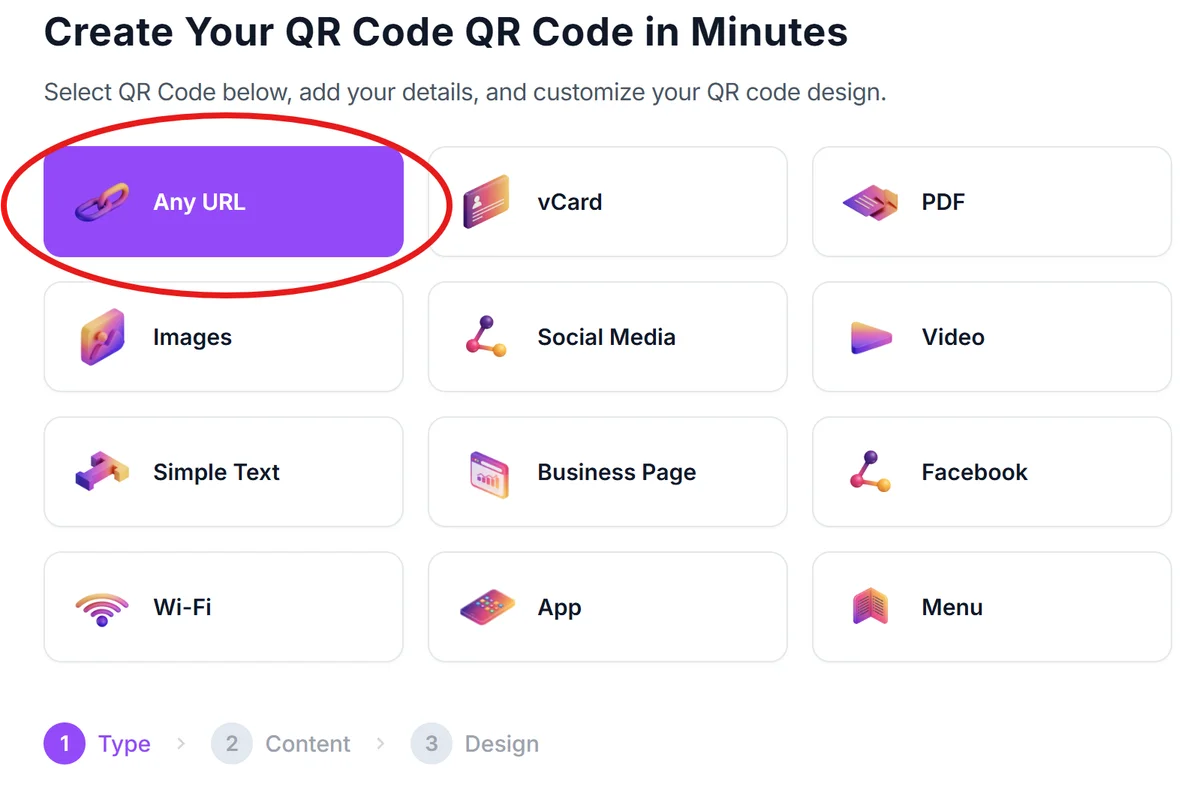
Enter your conference-specific information
Input the relevant data such as speaker contact details, presentation links, survey URLs, or conference app download pages that attendees will access.
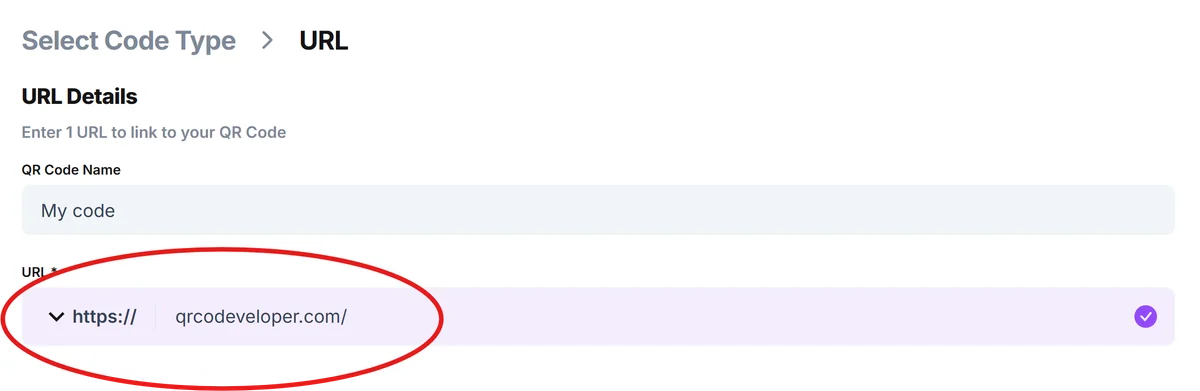
Customize for conference branding and visibility
Click on the pencil icon in the Preview window to further customize your code. Add your conference colors and logo using QR code design best practices while ensuring the QR code remains scannable under various lighting conditions typical of conference venues.

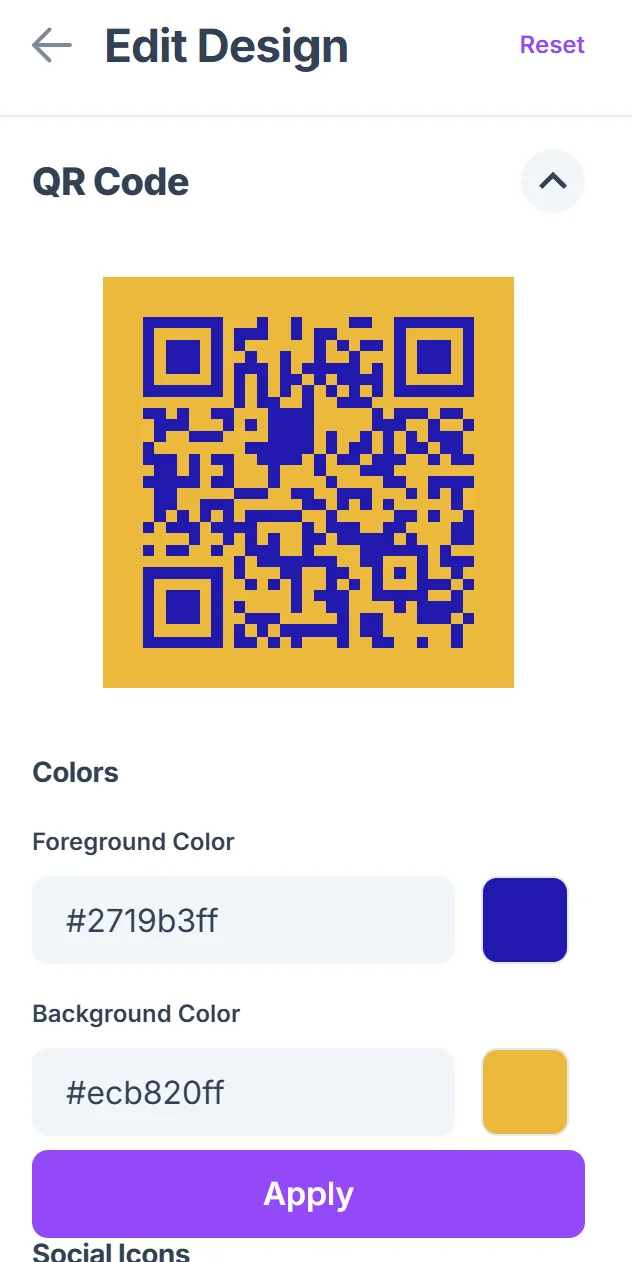
Test scanning in conference-like conditions
Verify your QR codes work with different smartphone cameras and under projected lighting, since many will be displayed on screens or printed materials.
Distribute across conference touchpoints
Place QR codes strategically on name badges, presentation slides, signage, and promotional materials where attendees naturally look for information.
Best practices for conference QR implementation
Successful conference QR codes require strategic placement and clear communication about their purpose to maximize attendee adoption.
Include brief instructions like "Scan for speaker contact" or "Get presentation slides" near each QR code to set clear expectations for attendees
Size QR codes appropriately for viewing distance - codes on presentation screens need to be much larger than those on business cards or name badges
Create backup plans for QR code failures by including shortened URLs as text alternatives, especially for critical information like emergency contacts
Track scan analytics to identify which conference touchpoints generate the most engagement and adjust your strategy for future events
Frequently Asked Questions
Do all smartphone cameras work with conference QR codes?
Yes, modern smartphones have built-in QR code scanning capabilities through their camera apps, making them accessible to virtually all conference attendees without requiring additional app downloads.
How large should QR codes be for conference presentations?
For presentation slides viewed from 10-15 feet away, QR codes should be at least 2x2 inches. For name badges or handouts, 1x1 inch works well for close-up scanning.
Can I update conference QR code content after printing materials?
Yes, when using dynamic QR codes, you can update the destination content without reprinting materials. This is particularly useful for schedule changes or updated presentation links.
What happens if conference WiFi is slow or unreliable?
QR codes work with cellular data as well as WiFi. For critical information, consider creating codes that link to lightweight pages or downloadable PDFs that load quickly on any connection.
Is there a cost to create conference QR codes?
Basic QR code generation is free, with premium features like analytics tracking and dynamic content updates available through paid plans for larger conferences requiring detailed engagement metrics.
Related Guides
Ready to create your QR code?
Generate custom QR codes in seconds - free and easy to use.
Create Free QR Code →