QR codes for webinars and virtual event registration

Bridge the gap between offline marketing and online attendance with scannable webinar access codes.
Connecting physical marketing to virtual attendance
As hybrid events become the new standard and audiences increasingly expect instant access to digital content, the disconnect between physical event promotion and online webinar registration has become a critical friction point for many. However, event marketers are turning to QR codes to bridge this gap, allowing attendees to move from seeing a poster or business card to registering for a webinar in seconds!
A webinar QR code shortens the time between discovery and registration by instantly connecting print materials, business cards, or conference displays to your webinar landing page. When someone scans the code with their phone, they're taken directly to your registration form or event details without typing long URLs or searching through emails.
This approach works particularly well for conferences, trade shows, and networking events where you're promoting upcoming webinars to people who might not have immediate access to their computers. Throughout this guide I'll walk you through creating effective webinar QR codes and share strategies that have helped event organizers boost their registration rates through better offline-to-online conversion. So let's get this conference started!
Practical webinar QR code applications
Webinar QR codes work best when they remove barriers between interest and action. The key is placing them where people have their phones ready and the motivation to learn more. Check out our event QR codes guide for broader event marketing strategies.
Conference booth promotion
Display QR codes on booth banners and handouts to let visitors instantly register for your upcoming webinar series while they're engaged with your brand.
Print advertisement follow-up
Include QR codes in magazine ads, direct mail pieces, or newspaper features to drive immediate webinar registration from readers who want to learn more.
Business card integration
Add webinar QR codes to business cards for sales teams and speakers, allowing new contacts to easily access your educational content after networking events.
Email signature promotion
Include QR codes in email signatures to make it easy for mobile users to register for webinars without switching between email and browser apps.
Building your webinar QR code
Creating a webinar QR code takes just a few minutes, but the setup you choose affects how well it converts interested prospects into registered attendees.
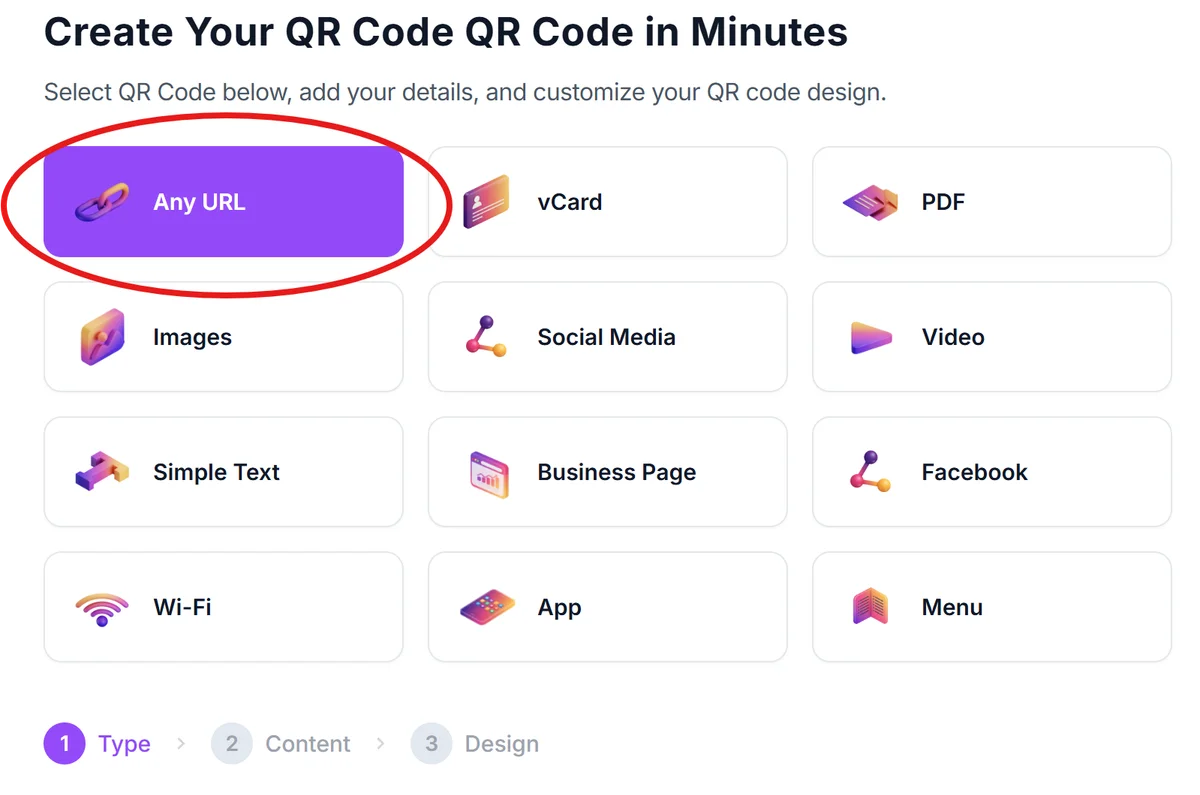
Access the QR code generator
Visit qrcodeveloper.com and select the URL option to create a link-based QR code for your webinar registration page.
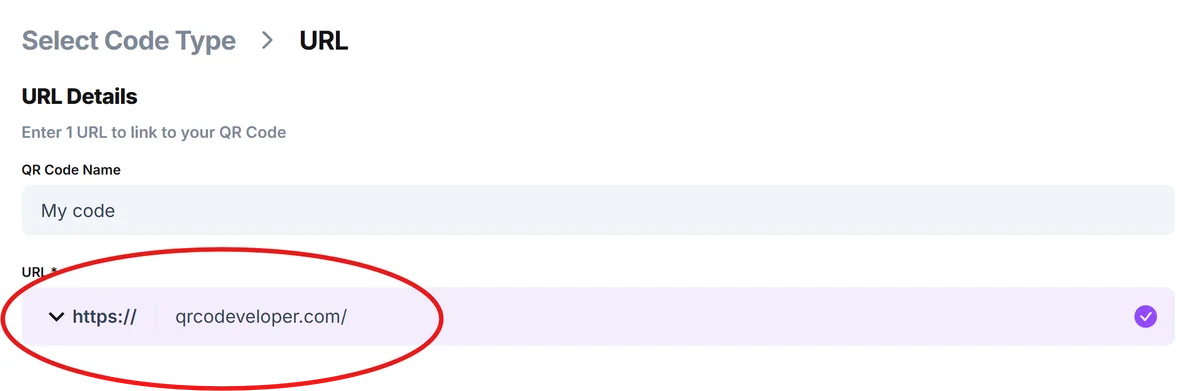
Enter your webinar registration URL
Paste the direct link to your webinar registration page or landing page. Make sure this link takes people straight to sign-up, not a general company page where they have to hunt for the webinar.
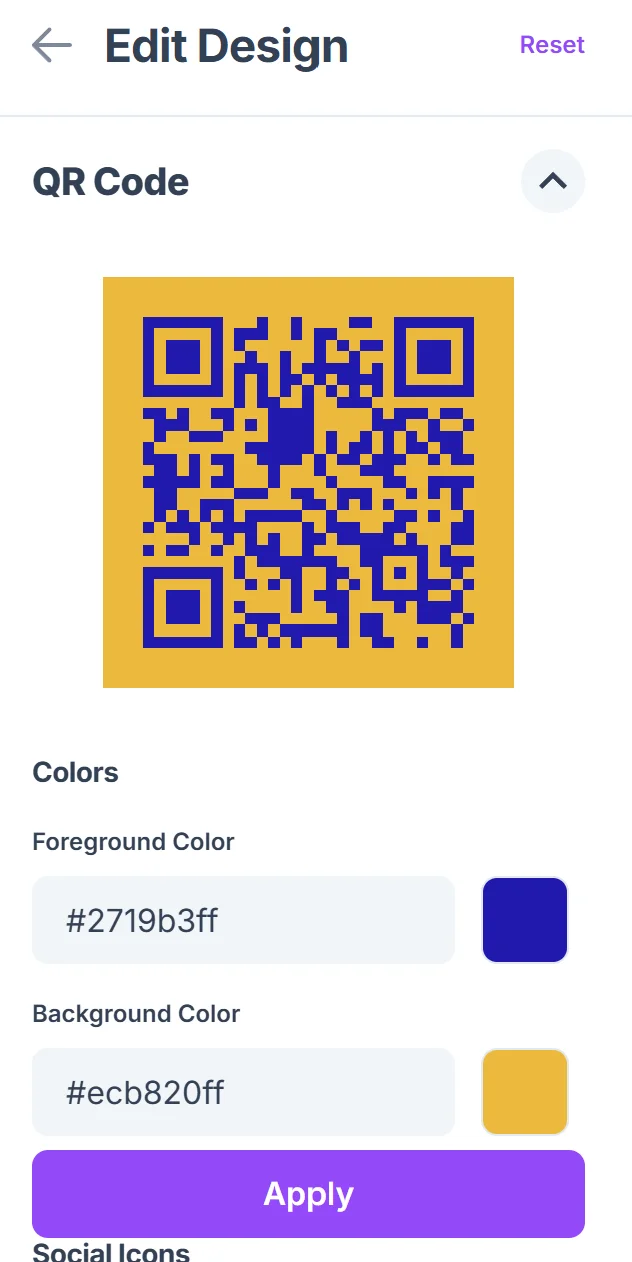
Customize with webinar branding
Add your company colors and logo to match your webinar branding. Consider using colors that stand out on your print materials while staying consistent with your event theme, following QR code design best practices.

Test the scanning experience
Scan your QR code with different devices to ensure the registration page loads quickly and displays properly on mobile screens. Test the entire registration flow from scan to confirmation.
Prepare for multi-format deployment
Download high-resolution versions for print materials and create different sizes for various applications—larger for banners, smaller for business cards and email signatures.
Maximizing webinar attendance through QR codes
The most effective webinar QR codes do more than just link to a registration page—they're part of a complete strategy that guides people from initial interest to actual attendance.
Include clear value propositions near your QR codes explaining what attendees will learn and why they should register now rather than later. Consider creating survey QR codes to gather feedback after your webinars for continuous improvement.
Use tracking parameters in your URLs to measure which QR code placements generate the most registrations and focus your efforts on high-performing locations
Create urgency by mentioning limited seats or early-bird pricing near QR codes, and ensure your landing page reinforces these time-sensitive benefits
Test QR code sizes for different contexts—codes on business cards need to be large enough to scan easily, while banner codes can be smaller relative to other design elements
Frequently Asked Questions
Can I track how many people scan my webinar QR code?
Yes, you can track QR code scans by using URL parameters or analytics tools. Add tracking codes to your webinar registration URL to see which QR code placements drive the most registrations.
What's the best size for webinar QR codes on print materials?
For business cards, make QR codes at least 0.8 inches square. For flyers and banners, 1-2 inches works well. The key is ensuring people can scan easily from a comfortable distance without having to get too close to the material.
Should I link directly to the webinar platform or my own landing page?
Link to your own landing page first. This gives you control over the user experience, lets you collect additional information, and provides backup options if your webinar platform experiences issues.
How do I handle different time zones in my webinar QR code strategy?
Create separate QR codes for different regions if you're running the same webinar at multiple times, or use a smart landing page that automatically shows the appropriate time zone and registration option based on the visitor's location.
Can I use the same QR code for multiple webinars?
It's better to create unique QR codes for each webinar so you can track performance accurately and update the destination without affecting other campaigns. You can reuse the design template but change the URL for each event.
Related Guides
Ready to create your QR code?
Generate custom QR codes in seconds - free and easy to use.
Create Free QR Code →