Best survey platforms to pair with QR codes: Google Forms, Typeform, Jotform

Skip the typing and URL sharing headaches—discover which survey platforms make QR code integration effortless for instant mobile feedback collection.
Why QR codes make surveys more accessible
Have you ever watched someone struggle to type a long survey URL on their phone, only to give up halfway through? Or have you ever been through this scenario yourself? It's a pretty common experience and explains why survey response rates often plummet. However, QR codes can help to eliminate this barrier entirely, letting respondents access your survey with a simple scan.

When you connect QR codes to survey platforms like Google Forms, Typeform, or Jotform, you're creating an instant pathway between physical media and digital feedback. Someone can scan a code on a restaurant table, event flyer, or product package and immediately start sharing their thoughts—no typing, no searching, no problem!
The platform you choose matters because each handles mobile optimization, data collection, and QR integration differently. In this piece I'll walk you through the strengths of each major platform and help you pick the right one for your specific survey needs. For broader survey strategies, check out our comprehensive QR codes for online surveys guide.
Smart ways to deploy survey QR codes
Survey QR codes work best when they're placed where people have time to respond and a reason to share feedback. The key is matching your platform's strengths to your collection method. Here are scenarios where different platforms excel, and you can learn more about mobile-friendly approaches in our QR code menu guide.
Event feedback collection
Place QR codes on exit signs, badges, or tables to capture immediate post-event impressions while experiences are fresh in attendees' minds. Learn more about creating event QR codes for comprehensive event feedback collection.
Product experience surveys
Include codes on packaging, receipts, or warranty cards to gather usage feedback and identify improvement opportunities from actual customers.
Location-based feedback
Mount weatherproof QR codes at retail locations, service counters, or public spaces to collect site-specific feedback and service ratings.
Educational assessments
Display codes in classrooms, training materials, or course handouts to gather learning feedback and comprehension checks from students.
Setting up survey QR codes on each platform
Each survey platform has its own workflow for generating shareable links, but the QR code creation process stays consistent. Here's how to connect your survey to a scannable code:
Build your survey in your chosen platform
Create your survey in Google Forms, Typeform, Jotform, or your preferred platform. Make sure all questions display properly on mobile devices before proceeding to QR generation with qrcodeveloper.com.
Copy your survey's public sharing link
Look for 'Share,' 'Send,' or 'Publish' options in your platform. Copy the public URL that allows anyone to access and complete your survey.
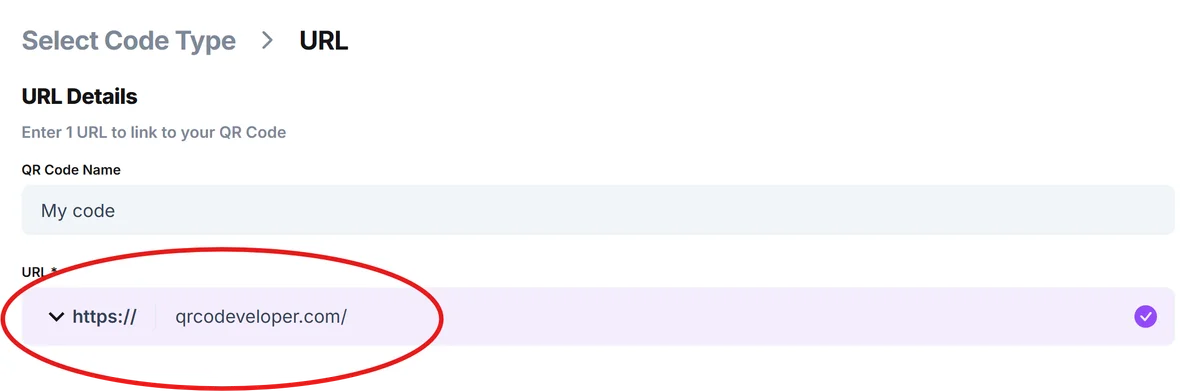
Generate your survey QR code
Paste your survey URL into the QR generator and customize the design to match your brand colors, add your logo, or include descriptive text that explains what the survey covers. For design inspiration, check out our QR code design tips.
Test across different devices
Scan your QR code with various phones and tablets to ensure the survey loads quickly and displays correctly on different screen sizes and operating systems.
Place codes strategically for maximum response
Position QR codes where people have time to complete surveys—avoid high-traffic areas where people are rushing, and include clear instructions about what the survey covers.
Platform-specific optimization strategies
Different survey platforms handle mobile traffic and QR integration with varying levels of success. Here's how to get the best results from each major platform:
Google Forms works best for simple surveys since it loads quickly on all devices and doesn't require accounts to complete. The clean interface reduces abandonment rates when people scan your QR code.
Typeform excels at engaging, conversational surveys that feel more like interactions than questionnaires. Use this platform when you want higher completion rates and more thoughtful responses from QR code traffic. Consider pairing surveys with QR code business cards for professional networking feedback.
Jotform offers the most customization options and integrates well with payment processing if you're collecting fees alongside survey responses. It's ideal for complex forms that need conditional logic.
SurveyMonkey provides robust analytics and can handle high-volume traffic from QR campaigns, but requires careful mobile optimization to prevent slow loading times that frustrate scanners.
Frequently Asked Questions
Which survey platform works best with QR codes?
Google Forms typically performs best because it loads quickly on all devices and doesn't require user accounts. Typeform creates more engaging experiences, while Jotform offers advanced customization options.
Can I track which QR codes generate the most survey responses?
Yes, create separate QR codes for different locations or campaigns, each linking to the same survey with tracking parameters. Most platforms let you add UTM codes or custom parameters to identify traffic sources.
Do survey QR codes work on all smartphones?
Modern smartphones can scan QR codes through their camera apps, but the survey platform's mobile optimization matters more. Test your specific survey on different devices to ensure compatibility.
How can I encourage more people to scan my survey QR codes?
Include clear instructions like 'Scan for 2-minute feedback' and mention any incentives. Place codes where people have time to respond, not in high-traffic areas where they're rushing.
Are QR code surveys free to create?
Creating QR codes is free, and most survey platforms offer free tiers with basic features. You'll only pay for premium survey features like advanced analytics, custom branding, or higher response limits.
Related Guides
Ready to create your QR code?
Generate custom QR codes in seconds - free and easy to use.
Create Free QR Code →