Stripe QR codes for contactless payments and checkout

Stripe payment QR codes eliminate checkout friction by connecting customers directly to your secure payment pages, boosting conversion rates and reducing cart abandonment.
How Stripe integrates with QR codes for payments
Small business owners often watch potential customers walk away after discovering the business only accepts cash, while the coffee shop next door processes contactless payments in seconds. These businesses need a payment solution that works across both physical and digital spaces without creating tension for their customers.
A Stripe QR code connects customers directly to your payment links, checkout pages, or subscription forms without requiring them to type URLs or navigate multiple pages. When someone scans your code, they will land on a secure Stripe-hosted payment page where they can complete their purchase with saved payment methods, Apple Pay, Google Pay, or traditional cards.
Payment QR codes work particularly well for businesses that need quick, contactless transactions. I recommend them for service providers, retail locations, and event organizers who want to reduce the steps between customer interest and completed payment. Creating one with QR Code Developer takes just minutes and works with any Stripe payment link you've already set up.
Business scenarios where Stripe QR codes excel
Stripe QR codes solve real payment challenges across different business models. They work especially well when you need to bridge the gap between physical and digital transactions. These codes integrate perfectly with QR code business cards and other marketing materials.
Service-based businesses and consultations
Coaches, consultants, and freelancers use QR codes on business cards or proposals to let clients pay invoices instantly. No more waiting for check processing or explaining payment portals.
Event ticketing and registration
Event organizers place QR codes on flyers, social media posts, and websites to sell tickets directly through Stripe. Attendees can purchase tickets without downloading apps or creating accounts.
Retail and pop-up shops
Physical retailers use QR codes for contactless checkout, especially for high-value items or when card readers aren't available. Customers can pay with their preferred digital wallet method.
Subscription and membership sign-ups
Gyms, co-working spaces, and subscription services use QR codes in their physical locations to convert visitors into paying members without requiring staff assistance.
Building your Stripe payment QR code
Setting up a Stripe QR code requires your payment link to be ready first. Once you have that, the QR code creation process connects everything together.
Generate your Stripe payment link
Log into your Stripe dashboard and create a payment link for your product or service. Copy the full URL that Stripe provides - this will be what your QR code connects to.
Enter your payment URL
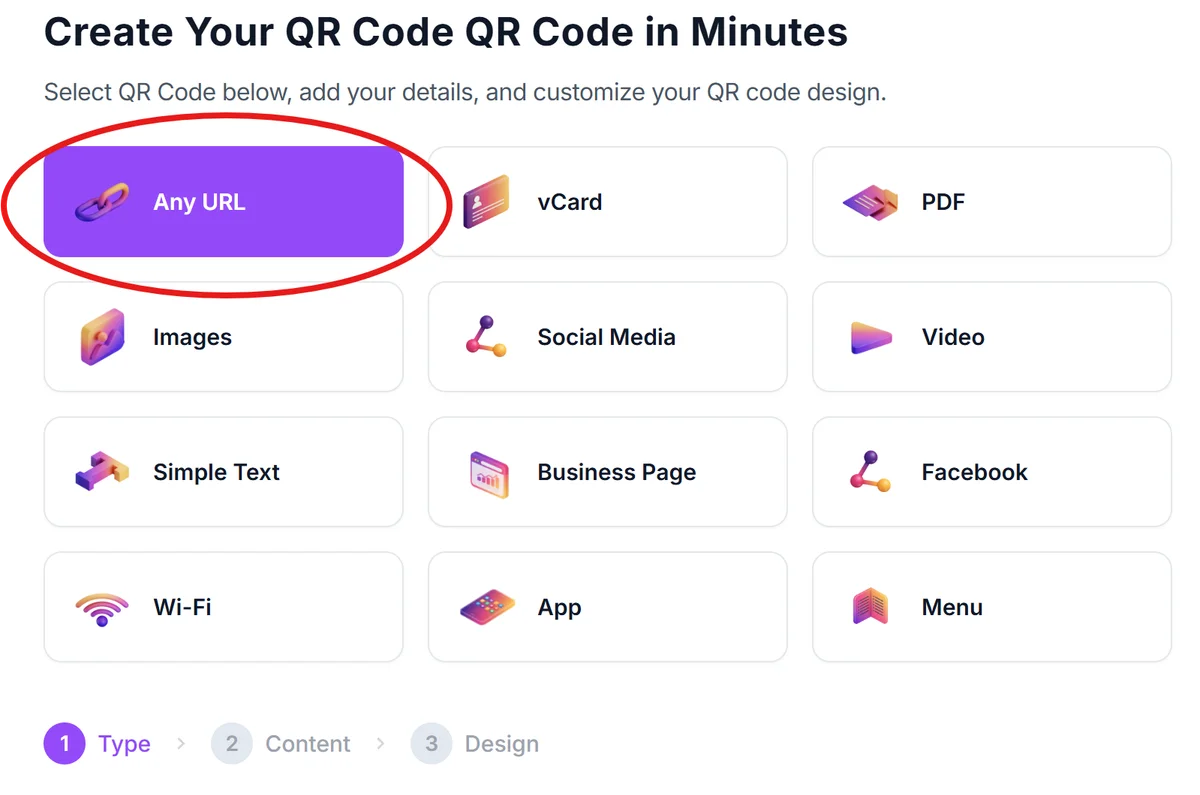
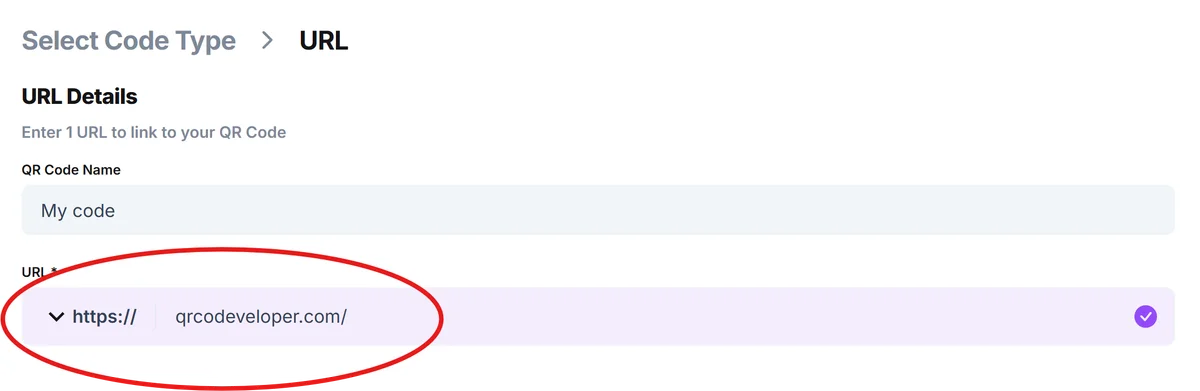
Visit qrcodeveloper.com and paste your Stripe payment link into the URL field. The generator will automatically detect it as a payment link.
Brand your payment experience
Customize your QR code colors to match your brand. Use your company colors and add a logo if you want customers to recognize it as your payment method immediately.

Test the complete payment flow
Scan your QR code with multiple devices to ensure it loads your Stripe page correctly. Test the payment process with a small amount to verify everything works smoothly.
Deploy across customer touchpoints
Add your QR code to invoices, business cards, physical signage, or marketing materials. You can even create QR code stickers for easy placement. Include brief instructions like 'Scan to pay securely with Stripe' to guide first-time users.
Maximizing conversions with payment QR codes
Strategic placement and clear instructions make the difference between QR codes that convert and ones that get ignored. These practices come from real businesses using Stripe QR codes successfully.
Place QR codes where customers are already thinking about payment - on invoices, checkout counters, or service completion confirmations. Context matters more than visibility.
Include trust signals near your QR code like 'Secured by Stripe' or security badges. Payment QR codes need extra reassurance since people are sharing financial information, especially given concerns about QR code safety.
Set up Stripe's success redirects to thank customers and provide next steps after payment. A good post-payment experience encourages repeat business and referrals.
Monitor your Stripe analytics to see which QR code placements drive the most conversions. Payment data shows you exactly where customers prefer to complete transactions.
Frequently Asked Questions
Do I need a Stripe account to create payment QR codes?
Yes, you need an active Stripe account with payment links set up. The QR code connects to your Stripe-hosted payment pages, so your account must be configured first.
Can customers pay with different methods through Stripe QR codes?
Absolutely. Stripe payment pages accept credit cards, debit cards, Apple Pay, Google Pay, and other digital wallets depending on your account settings and customer location.
How secure are Stripe QR codes for payments?
Very secure. The QR code only contains a link to your Stripe payment page - no financial information is stored in the code itself. All transactions use Stripe's PCI-compliant infrastructure.
Can I track which QR codes generate the most payments?
Yes, by creating separate Stripe payment links for different QR code locations, you can track performance in your Stripe dashboard. This helps identify your most effective placement strategies.
Do Stripe QR codes work internationally?
They work wherever Stripe operates and customers have internet access. Payment methods available will depend on the customer's location and your Stripe account configuration.
Related Guides
Ready to create your QR code?
Generate custom QR codes in seconds - free and easy to use.
Create Free QR Code →