Pro certification QR codes for credential verification

Connect employers and clients directly to your verified professional credentials with scannable QR codes on resumes, business cards, and portfolios.
Why professionals use QR codes for certification verification
Have you ever watched a hiring manager squint at your resume, struggling to read it or trying to verify a certification by typing long URLs into their browser? A Professional certification QR codes solve this common problem by connecting employers, clients, and colleagues directly to your verified credentials with a simple scan. Instead of having people to manually search for your certifications online, you provide instant access to your digital badges, certificate pages, and professional profiles. This approach works similarly to how QR codes enhance resumes by making information instantly accessible.
A professional certification QR code links to any digital credential verification page—whether that's a Credly badge, LinkedIn certification, industry-specific credential portal, or your professional portfolio showcasing multiple certifications. When someone scans your code, they can immediately see proof of your qualifications without the hassle of manual verification.
This approach works particularly well for professionals in regulated industries where credential verification is crucial. Throughout this guide, I'll show you how to create effective certification QR codes using QR Code Developer. I'll also share strategies for placing them where they'll have the most impact on your career. So let's get started!
Professional contexts where certification QR codes make impact
Professional certification QR codes work best when they solve real verification challenges that employers and clients face. The key is placing them in contexts where people expect to verify your credentials. Consider how QR code business cards have transformed networking by making contact sharing instant.
Resume and portfolio enhancement
Add QR codes next to certification listings on your resume or portfolio, letting hiring managers verify credentials instantly rather than searching certification databases manually. This creates a seamless verification experience similar to how PDF QR codes provide instant access to detailed documents.
Conference networking and presentations
Include certification QR codes on business cards, name tags, or presentation slides when speaking at industry events where your expertise needs immediate verification.
Client proposal credibility
Embed certification QR codes in consulting proposals, project bids, or service agreements to help clients verify your qualifications before making hiring decisions.
Professional social media profiles
Add certification QR codes to LinkedIn posts, professional bio pages, or email signatures to make credential verification seamless for potential connections and employers. You can also include them in contact information QR codes to provide comprehensive professional details in one scan.
Building your professional certification QR code
Creating a certification QR code takes just a few minutes once you have your credential verification URL ready. The process focuses on connecting people to legitimate, third-party verification rather than self-hosted claims.
Access your certification verification URL
Visit qrcodeveloper.com and select URL as your QR code type. Most professional certifications provide public verification links through platforms like Credly, Accredible, or industry-specific portals.
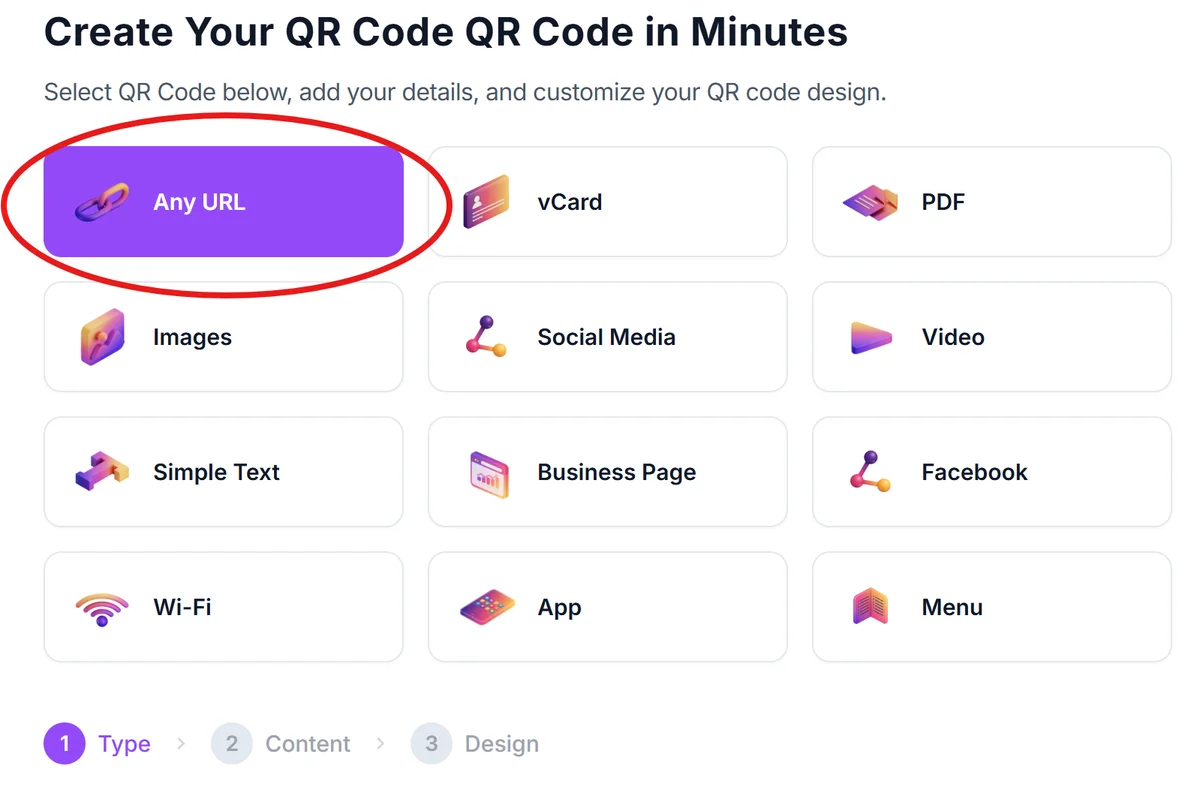
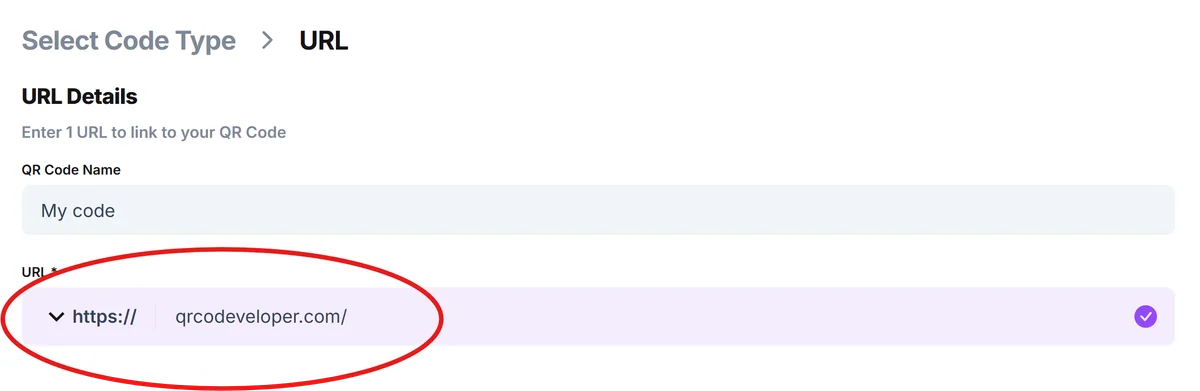
Input your credential verification link
Paste the direct URL to your certification verification page. Avoid generic profile links—use the specific URL that shows the individual certification or badge you want to highlight.
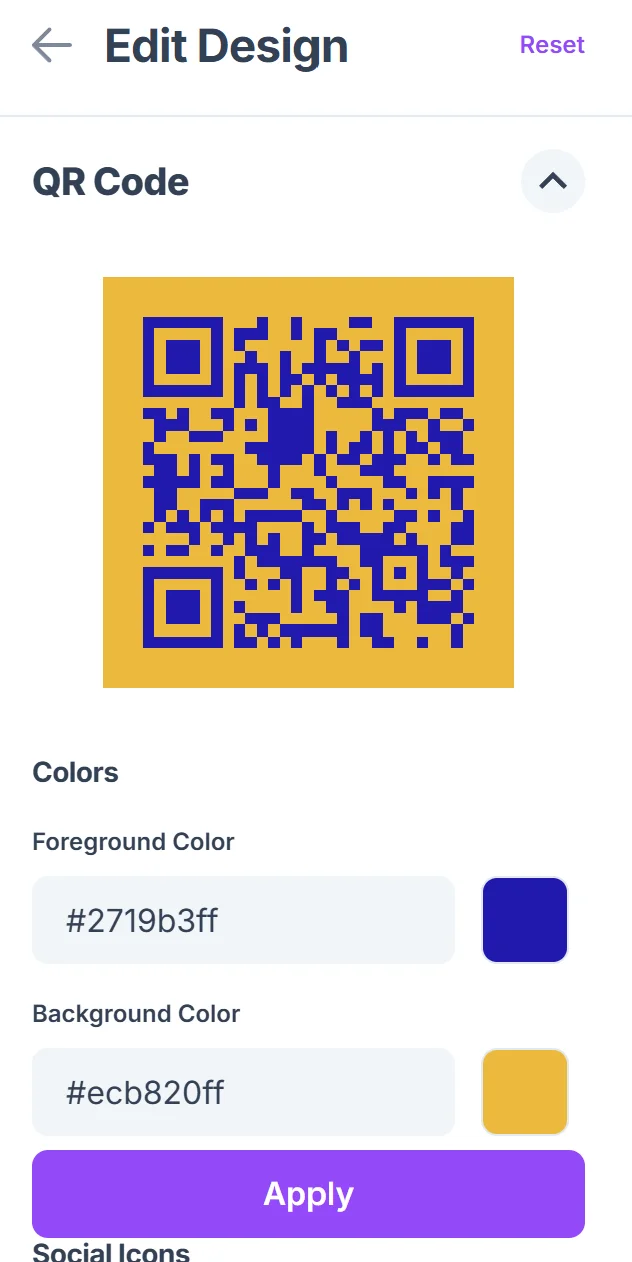
Design for professional contexts
Choose colors that match your resume, business card, or professional brand. Keep designs clean and professional since these codes will appear in formal business contexts. For guidance on creating visually appealing codes, check out our QR code design tips to ensure your certification codes look polished and trustworthy.

Test with industry colleagues
Before printing on business materials, test your QR code with colleagues in your field to ensure the verification page loads quickly and displays your credentials clearly.
Integrate into professional materials
Add the QR code to your resume next to relevant certifications, include it on business cards, or embed it in digital portfolios where credential verification adds value.
Best practices for credential QR codes
Professional certification QR codes require different considerations than casual QR codes since they impact your career reputation and need to work flawlessly in business contexts.
Link to third-party verification platforms rather than self-hosted pages to maintain credibility—employers trust Credly, LinkedIn Learning, or industry certification bodies more than personal websites
Include brief context near your QR code like 'Scan to verify PMP certification' so people understand what they're accessing before scanning
Test QR codes on different devices and network conditions since hiring managers might scan them on corporate networks with security restrictions
Keep backup verification methods available—include the certification number or issuing organization name alongside the QR code in case scanning fails
Frequently Asked Questions
What types of professional certifications work best with QR codes?
Any certification with a public verification URL works well—including IT certifications, project management credentials, professional licenses, digital marketing certifications, and industry-specific qualifications from recognized bodies.
Should I create separate QR codes for each certification?
Yes, create individual QR codes for each major certification rather than linking to a general profile page. This allows you to highlight specific credentials relevant to particular job applications or client proposals.
How do I handle certifications that expire or need renewal?
Monitor your certification QR codes regularly and update them when credentials renew. Most certification platforms maintain the same URL but update the expiration date, so your QR code should continue working.
Where should I place certification QR codes on my resume?
Add QR codes directly next to the certification listing in your qualifications section, or create a dedicated 'Verify Credentials' section with multiple QR codes if you have several important certifications.
Are certification QR codes free to create and use?
Yes, creating QR codes for certification verification is completely free. The ongoing cost depends on your certification platform—most professional credential platforms provide free public verification pages.
Related Guides
Ready to create your QR code?
Generate custom QR codes in seconds - free and easy to use.
Create Free QR Code →