AliExpress QR code generator for product sharing and marketing

Share AliExpress products instantly with scannable codes that connect customers directly to listings and boost your affiliate earnings.
How QR codes simplify AliExpress product sharing
Over 150 million people shop on AliExpress annually, but sharing specific products often involves copying long, complex URLs that are difficult to type on mobile devices. A single AliExpress product URL can contain 200+ characters with tracking parameters, making manual entry nearly impossible. Luckily, a simple QR code can help out immensely!
AliExpress QR codes solve this problem by converting product links, store pages, or affiliate URLs into scannable codes. Customers simply point their phone camera at the code to instantly access the exact product or store you want to share. This works for individual product listings, entire storefronts, or affiliate links with your commission tracking intact, similar to how Linktree QR codes simplify access to multiple links.
Whether you're an affiliate marketer, dropshipper, or content creator, these codes eliminate the friction between product discovery and purchase. In this guide I'll show you how to create AliExpress QR codes that maintain your affiliate tracking while making it incredibly easy for customers to find and buy the products you recommend through our QR code generator. So let's dive right in!
Smart ways to use AliExpress QR codes for business
AliExpress QR codes bridge the gap between offline marketing and online sales, making it easier to drive traffic to specific products or stores. These codes work particularly well for business cards and marketing materials where typing long URLs isn't practical.
Affiliate marketing campaigns
Include QR codes in YouTube videos, blog posts, or social media to drive traffic to AliExpress products while preserving your affiliate tracking parameters.
Dropshipping product catalogs
Create printed catalogs or flyers with QR codes linking directly to AliExpress suppliers, making it easy for customers to order products you're dropshipping.
Social media content
Add QR codes to Instagram stories, TikTok videos, or Facebook posts to instantly connect followers with products you're featuring or reviewing.
Event marketing and trade shows
Display QR codes at booths or presentations to share product recommendations without requiring attendees to manually type complex URLs on their phones.
Creating QR codes for AliExpress products and stores
Setting up AliExpress QR codes takes just a few minutes and works with any product link, store page, or affiliate URL from the platform.
Navigate to the QR code generator
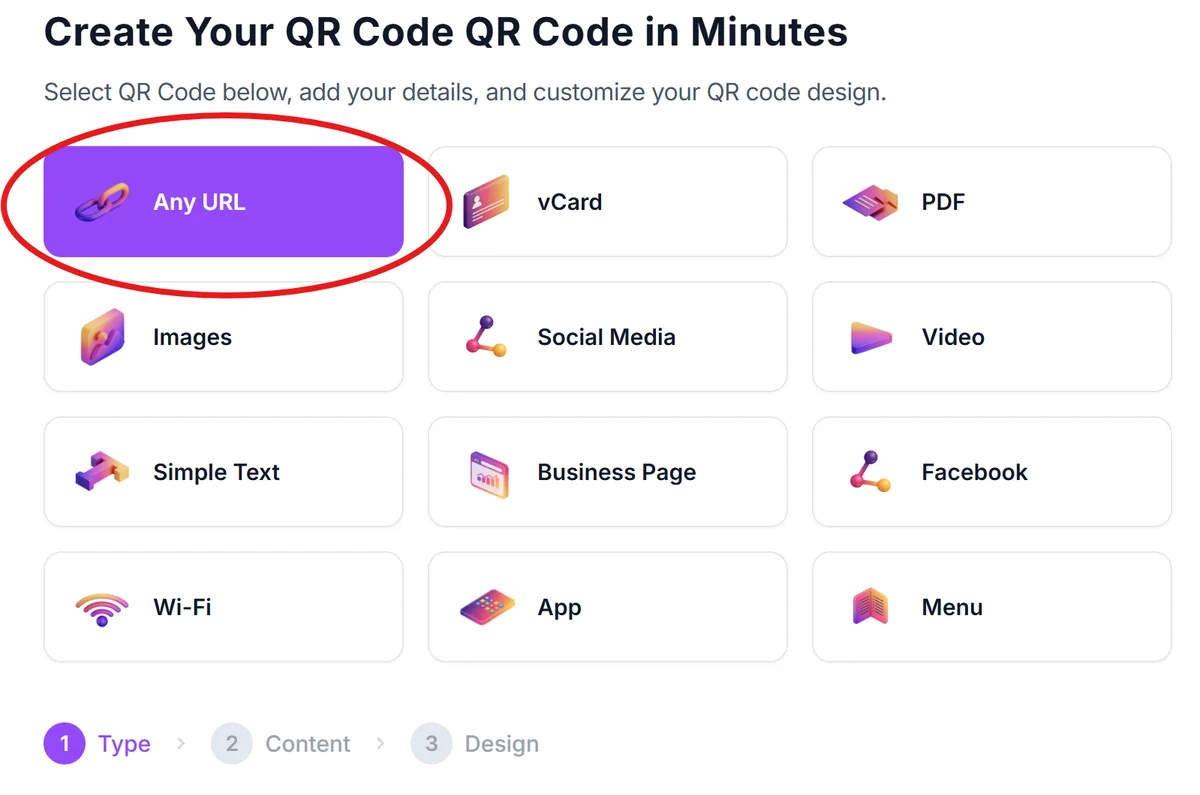
Go to qrcodeveloper.com and select 'URL' as your QR code type. This option works perfectly for all AliExpress links, including product pages and affiliate URLs.
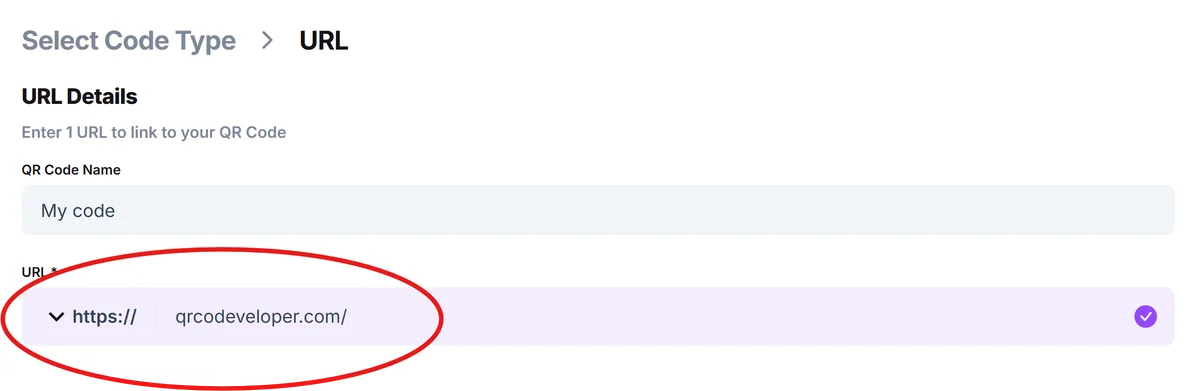
Copy your AliExpress product or store URL
From AliExpress, copy the full URL of the product, store, or affiliate link you want to share. Make sure to include any affiliate tracking parameters if you're earning commissions.
Customize your QR code appearance
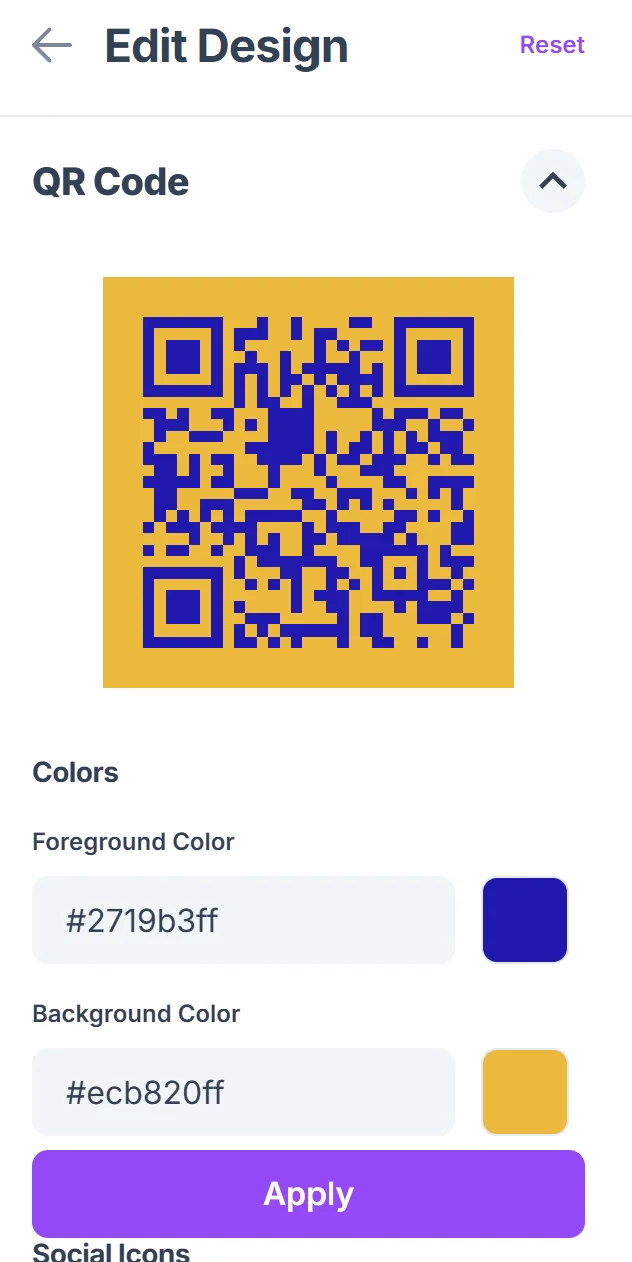
Click on the pencil icon in the Preview window to further customize your code. Choose colors that match your brand or content theme. Consider using AliExpress's orange color (#FF6600) or colors that complement your marketing materials for better brand recognition, following QR code design best practices.

Test the code before sharing
Scan your QR code with multiple devices to ensure it opens the correct AliExpress page and that any affiliate tracking is working properly. Test on both iOS and Android devices.
Download and implement in your marketing
Save your QR code as a high-resolution PNG and add it to your marketing materials, social media posts, videos, or printed materials where you want to drive AliExpress traffic. You can even create QR code stickers for physical product packaging or promotional materials.
Maximizing conversions with AliExpress QR code strategies
Strategic placement and design of your AliExpress QR codes can significantly impact scan rates and conversions. Here's how to get the most from your codes:
Always include a clear call-to-action near your QR code, like 'Scan to shop this product' or 'Get instant access to this deal' - vague codes get fewer scans
Place QR codes at the end of product reviews or unboxing videos when viewers are most interested in purchasing what they just saw
Use shortened, clean AliExpress URLs when possible to create simpler QR codes that scan more reliably, especially in poor lighting conditions
Track which QR codes perform best by creating unique affiliate links for different campaigns, allowing you to see which placements drive the most sales
Frequently Asked Questions
Do AliExpress QR codes preserve my affiliate commissions?
Yes, as long as you use your complete affiliate link when creating the QR code, all tracking parameters remain intact and you'll receive your commissions normally.
Can I create QR codes for entire AliExpress stores?
Absolutely. You can create QR codes for any AliExpress URL, including store homepages, category pages, or search results - not just individual products.
Will these QR codes work internationally?
Yes, QR codes work globally, but keep in mind that AliExpress availability and pricing may vary by country. The link will work, but the shopping experience may differ based on the user's location.
How long do AliExpress QR codes remain valid?
QR codes themselves don't expire, but the AliExpress links they contain may become invalid if products are discontinued or URLs change. Always test your codes periodically.
Can I customize QR codes to match my brand colors?
Yes, you can customize colors, add logos, and adjust the design while maintaining scannability. Just ensure sufficient contrast between the foreground and background colors.
Related Guides
Ready to create your QR code?
Generate custom QR codes in seconds - free and easy to use.
Create Free QR Code →