QR codes guide: everything you need to know about QR technology

Master QR code technology from basics to advanced applications with practical examples and step-by-step creation guides.
Understanding QR code technology and how it works
What if you could instantly bridge the gap between physical and digital worlds with a simple can? Well, QR codes can do exactly that, transforming static objects into interactive gateways that connect people to websites, contact information, payments, and virtually any digital content imaginable.
QR codes (Quick Response codes) are two-dimensional images that store information in a matrix of black and white squares. Unlike traditional barcodes that only hold limited data horizontally, QR codes can store up to 4,296 alphanumeric characters both horizontally and vertically. This makes them incredibly versatile for everything from sharing WiFi passwords to processing payments.
Throughout this comprehensive guide, I'll walk you through everything you need to know about QR codes, from basic concepts to advanced applications. I'll also go over the practical use cases, and teach you how to create your own codes using QR Code Developer, and understand best practices that ensure your QR codes work reliably across different devices and situations. So let's get started!
Real-world applications across industries and daily life
QR codes have evolved far beyond simple website links to become essential tools across industries and personal use. From contactless payments to interactive marketing campaigns, they solve real problems by making information instantly accessible. Explore our types of QR codes guide to understand the full range of possibilities.
Business and marketing applications
Companies use QR codes on business cards, flyers, and product packaging to drive traffic to websites, social media profiles, or promotional content. They're particularly effective for tracking marketing campaign performance.
Restaurant and hospitality services
Restaurants replaced physical menus with QR codes during the pandemic, allowing customers to view menus on their phones. Hotels use them for contactless check-ins and room service ordering.
Event management and ticketing
Event organizers use QR codes for digital tickets, attendee check-ins, and sharing event information like schedules, maps, and speaker details. They reduce paper waste and speed up entry processes.
Creating your first QR code in minutes
Creating a QR code is straightforward once you know the basic steps. The process involves selecting your content type, entering your information, customizing the appearance, and testing the final result.
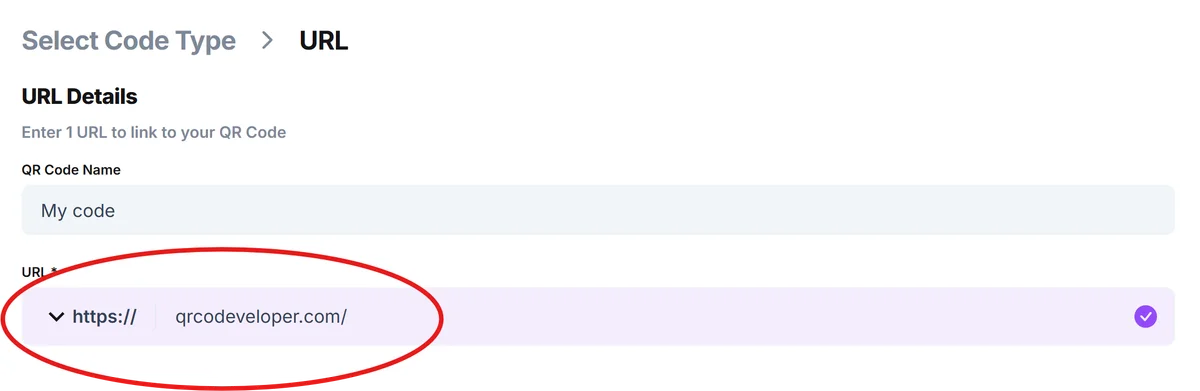
Navigate to a QR code generator
Visit qrcodeveloper.com to access a reliable, free QR code generator that supports multiple content types and customization options.
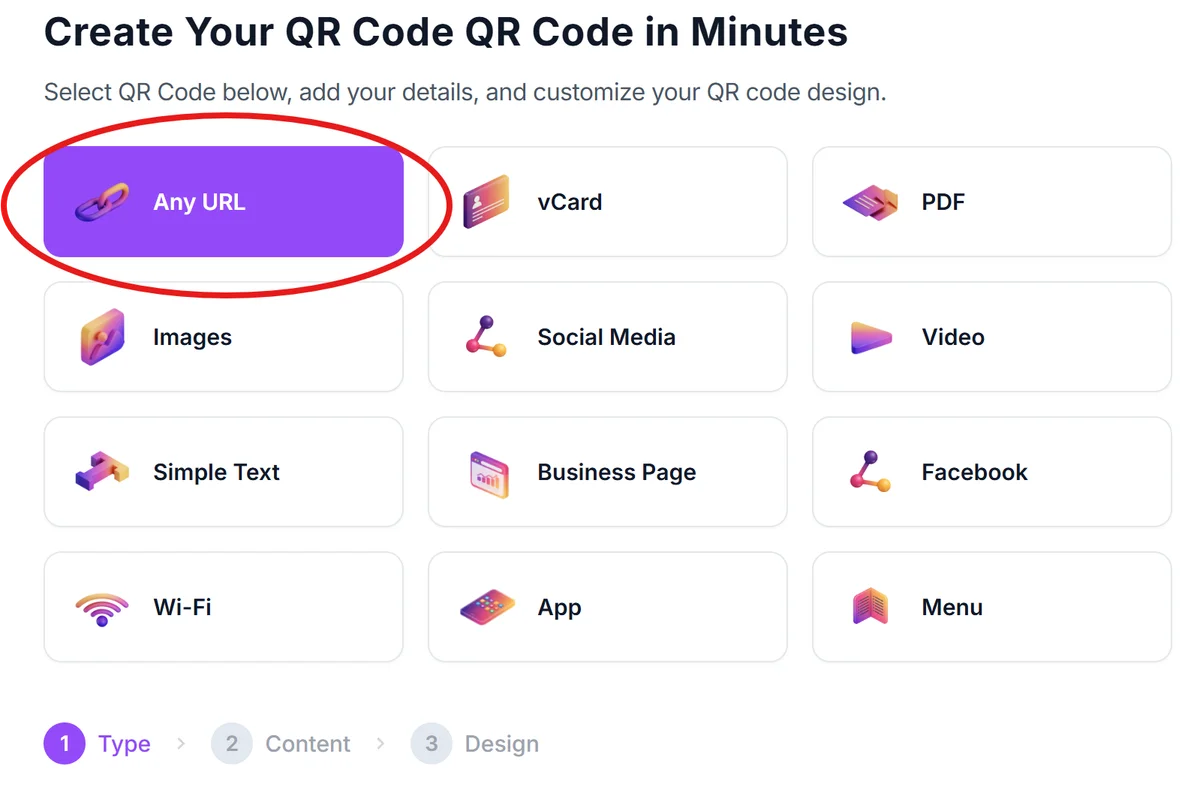
Select your content type and enter information
Choose what type of information you want to encode - whether it's a website URL, contact information, WiFi credentials, or plain text. Enter the specific details in the provided fields.
Customize appearance and branding
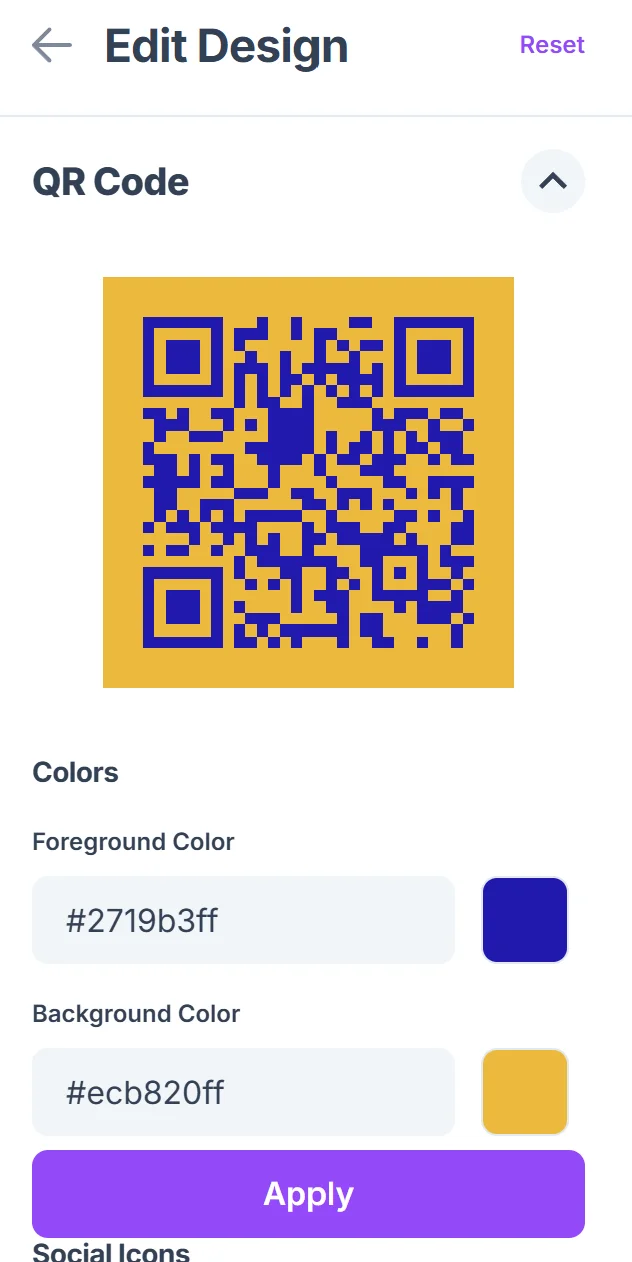
Click on the pencil icon in the Preview window to further customize your code. Adjust the QR code's colors, add a logo if needed, and select the appropriate size for your intended use. Consider where the code will be placed when choosing design elements.

Download and test functionality
Generate and download your QR code in the appropriate format (PNG, SVG, etc.). Test it with multiple devices and QR code scanning apps to ensure it works correctly.
Deploy and monitor performance
Place your QR code in its intended location and monitor how often it's scanned. Consider creating multiple versions for different campaigns to track which performs best.
Best practices for effective QR code implementation
Successful QR code implementation requires attention to design, placement, and user experience. These proven strategies will help ensure your QR codes perform reliably and provide value to users.
Ensure adequate size and contrast - QR codes should be at least 2x2 centimeters when printed and maintain high contrast between foreground and background colors for reliable scanning
Include clear instructions or call-to-action text near the QR code explaining what users will find when they scan, such as 'Scan for menu' or 'Scan to connect to WiFi'
Test across different devices and lighting conditions before deployment, as older phones or poor lighting can affect scanning performance
Consider the scanning environment - avoid placing QR codes in areas with poor lighting, behind glass, or where people can't comfortably hold their phones to scan
Frequently Asked Questions
Are QR codes safe to scan?
QR codes themselves are safe, but they can link to malicious websites. Only scan QR codes from trusted sources and be cautious of codes found in public places or received from unknown senders.
Do QR codes expire or stop working?
Static QR codes never expire - they contain the information directly. Dynamic QR codes depend on the service provider and may have expiration dates or usage limits depending on your plan.
Can I customize QR codes with colors and logos?
Yes, you can customize QR codes with colors, logos, and different designs while maintaining functionality. However, ensure sufficient contrast and don't cover more than 30% of the code with logos.
What's the difference between static and dynamic QR codes?
Static QR codes contain the information directly and can't be changed after creation. Dynamic QR codes use a short URL that redirects to your content, allowing you to update the destination without reprinting the code.
How much information can a QR code store?
QR codes can store up to 4,296 alphanumeric characters, 2,953 bytes, or 1,817 Japanese characters. However, more data creates denser codes that may be harder to scan reliably.
Related Guides
Ready to create your QR code?
Generate custom QR codes in seconds - free and easy to use.
Create Free QR Code →