Can you make QR codes in different shapes?

Custom-shaped QR codes give brands a distinctive look on packaging, menus, and posters while keeping scan reliability intact when the design follows a few structural rules.
Key Takeaways
- The three corner "eyes" and the overall square grid must stay intact, or scanners will fail to lock onto the code.
- Rounded modules, dots, and custom eye shapes are the safest styling changes because they don't touch the code's error-correction structure.
- Adding a logo in the center works because QR codes include built-in error correction that tolerates a small covered area.
- Full "novelty" shapes, like a QR code cut into a star outline, almost always fail unless a huge margin of error correction and testing is applied.
A standard QR code is a grid of black and white squares because that grid is what scanners are trained to read. But the pattern doesn't have to look plain. Rounded modules, dot-style pixels, custom colors, and embedded logos are all common today, and you'll see them on everything from coffee bags to concert posters.
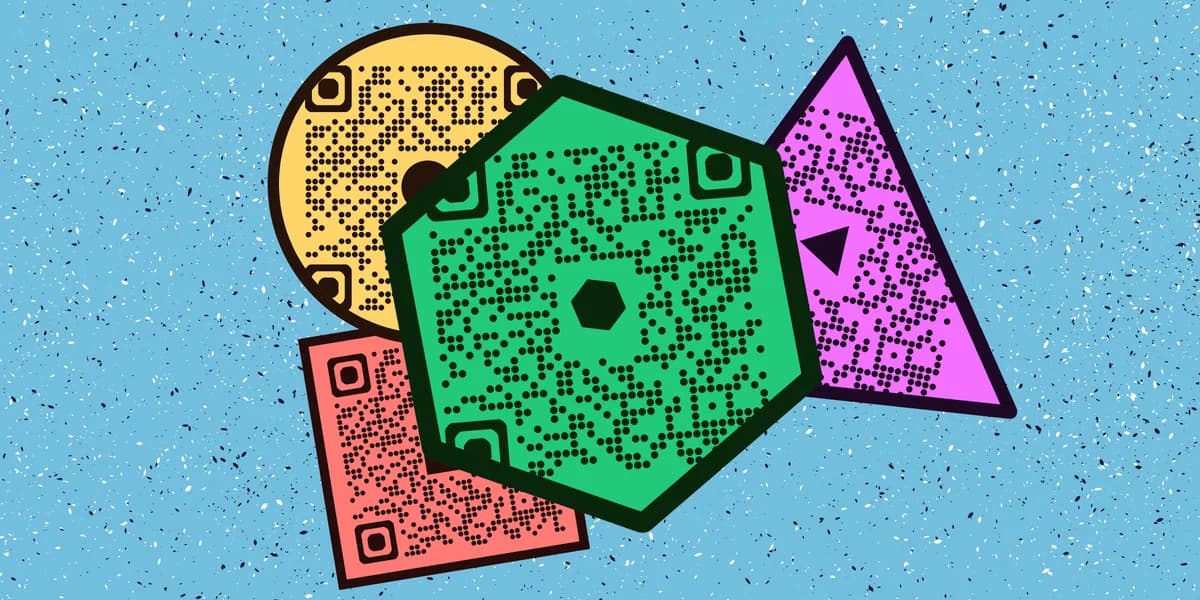
The short answer to "can you make QR codes in different shapes" is yes — with caveats. You can round the corners of the individual squares, swap the square eyes (the three big corner markers) for circles or custom icons, and recolor the whole thing. What you can't do is bend the code into a circle, a heart, or a star without breaking its ability to scan, because the underlying data grid still needs to stay in a recognizable square arrangement.
Most free tools, including the QR code generator, include shape and style options so you don't need design software to pull this off.
How to design a shaped QR code, step by step
Reshaping a QR code isn't a single click — it's a sequence of small style choices layered on top of a working code. Here's the order that keeps the final design both attractive and scannable.
Step 1: Generate the base code with your actual data
Start with the content you want the code to point to, whether that's a URL, a menu, or a contact card. Enter it into a tool like the QR code generator and confirm it scans correctly in plain black and white before you touch any styling, and if you're still deciding what data to encode, our guide to types of QR codes can help. This gives you a working baseline to compare against later.
Step 2: Choose a module shape
Most generators let you swap the small square dots that make up the code for rounded squares, circles, or diamond shapes. This is the safest and most common way to change a QR code's look. It softens the appearance without disturbing the spacing scanners rely on.
Step 3: Restyle the corner eyes
The three larger squares in the corners help scanners find and orient the code. You can round them, turn them into circles, or use a custom frame, but avoid removing them or shrinking them disproportionately. If you're building something brand-heavy, check our QR code design tips for combinations that hold up well in print.
Step 4: Add color with contrast in mind
Dark modules on a light background scan best. If you want brand colors, keep the foreground significantly darker than the background — a light gray on white or pastel-on-pastel combo will cause scan failures in low light. Gradients are fine as long as contrast stays strong across the whole code.
Step 5: Insert a logo, not a full image
A small logo placed in the center takes advantage of the code's error correction, which can typically recover up to 30% of damaged or covered data depending on the correction level chosen. Keep the logo modest in size — covering more than a quarter of the code invites scan problems.
Step 6: Test before you print at scale
Print a sample or view it at actual size on a few different phones before committing to a full run of flyers, stickers, or packaging. Lighting, camera quality, and surface texture all affect scan success, so testing catches issues a screen preview can miss. This matters just as much for a QR code sticker as it does for a printed flyer.
Tips for keeping shaped codes scannable
Styling a QR code is mostly about knowing where you have creative room and where you don't. These tips help you stay on the safe side of that line.
Keep the quiet zone — the blank border around the code — untouched even when you change module shapes, since scanners use it to detect edges.
Raise the error correction level before adding a logo or heavy color changes, since higher correction gives the code more room to tolerate visual noise, a concept covered further in our guide to understanding QR codes.
Avoid cutting the code into a non-square outline (hearts, stars, circles) unless you've tested extensively, because scanners expect a roughly square data field.
Match module shape to your printing method — dot-style patterns can blur on low-resolution printers, while rounded squares tend to hold up better at small sizes.
Frequently Asked Questions
Can a QR code be a circle instead of a square?
The outer frame can look circular if you add a decorative border, but the actual data pattern inside needs to stay in its square grid. Codes advertised as "circular" usually place a circular graphic around a standard square code rather than reshaping the code itself.
Will adding a shape or logo reduce how well the QR code scans?
It can, if the changes are too aggressive. Small module rounding and a modest centered logo usually scan fine, especially at higher error correction levels. Large logos, low contrast colors, or missing corner eyes are the most common causes of scan failure.
Do shaped QR codes work the same as regular ones once scanned?
Yes. Once a phone camera successfully reads the code, it behaves exactly like a standard black-and-white QR code and opens whatever link or content was assigned to it, whether that's a website, a WiFi login, or a contact card.
What's the safest style change to make first?
Rounding the module corners slightly and adjusting colors for contrast is the lowest-risk change. It gives a noticeably different look from a stock black-and-white code without touching the structural elements scanners depend on.
Are dynamic QR codes easier to restyle than static ones?
Styling options are generally the same for both, but dynamic codes let you update the destination later without reprinting, which matters if you're investing time in a custom design. Our static vs dynamic QR codes guide breaks down the difference in more detail.
Related Guides
Ready to create your QR code?
Generate custom QR codes in seconds - free and easy to use.
Create Free QR Code →